

- Tool permissions answer “should this call run, and who decides?”
- User-first tools answer “can the agent reach for this tool on its own?”
For end users
Approving or rejecting a call
When a tool needs approval, the chat pauses on a card showing the tool name, the arguments the agent is about to send, and Approve / Reject buttons.- Approve → the call runs and the agent picks up.
- Reject → the agent is told you said no and adapts.
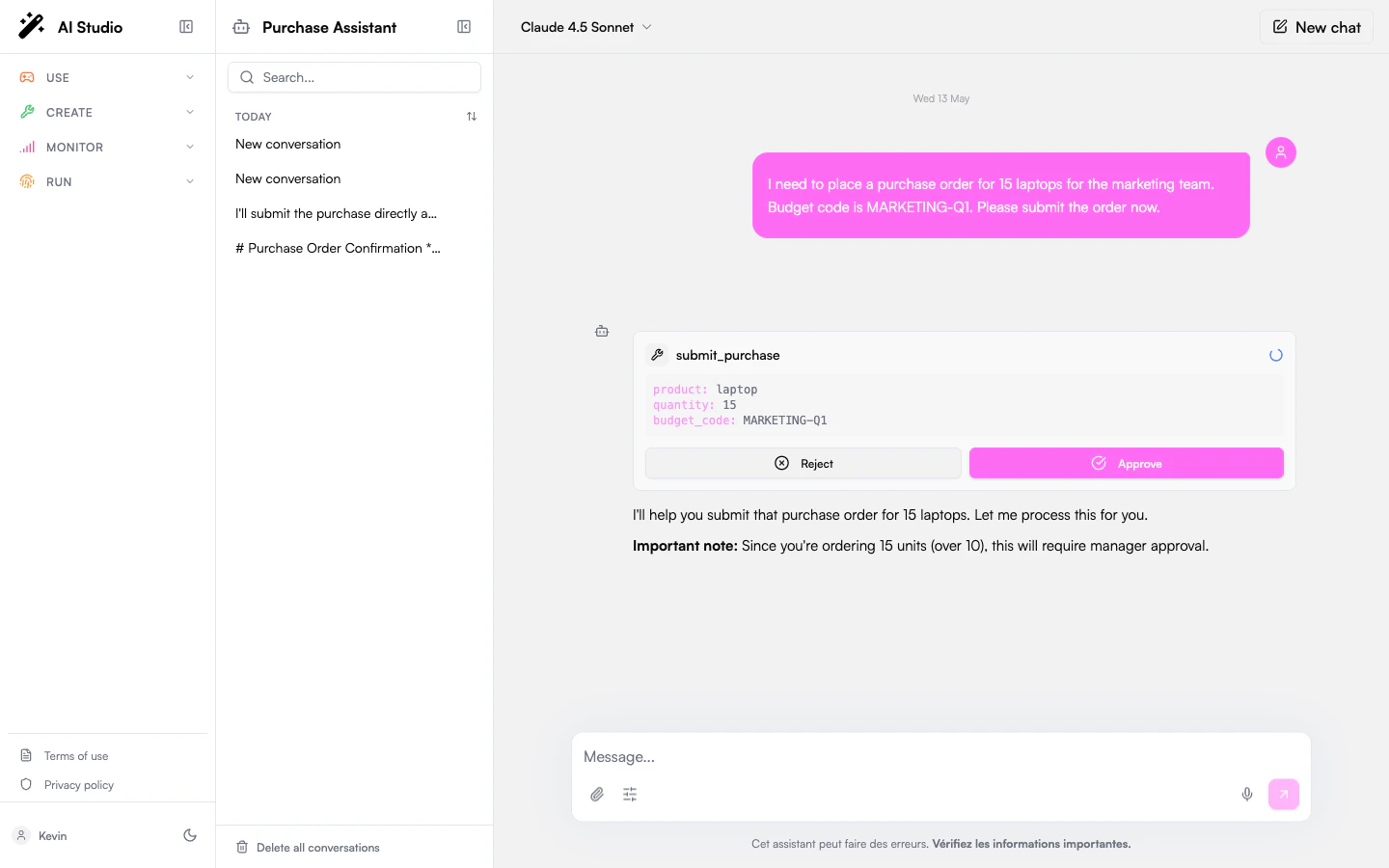
Several tools in one message. A model often asks for more than one tool at a time. When one of them needs approval, the others are held with it rather than dropped: your decision is applied to that call, and the turn then resumes with the whole set, so the agent never ends up answering with half of the results it asked for.
- Answering with a message instead of a button denies the pending tools. Your message is delivered as the next thing the agent hears, nothing disappears from the conversation, and the agent adapts as it would after a Reject.
- Refreshing the page keeps the approval. The card comes back actionable on the message it belongs to, so an approval left open can be resolved later, or from another device.
- System tools are never gated. Policies apply to the tools acting on the outside world; the agent’s internal machinery (
todo_write,budget_get_remaining,human_ask_clarification) runs without asking even under Always ask. See System tools by profile.
Designated approvers
For sensitive tools an administrator can route the approval to someone other than you: for example, a manager, an on-call group, or the agent’s owner. When that’s the case, you’ll see:“This action requires approval from a designated approver. You will be notified when it is resolved.”The current conversation stays paused until they decide. You can start a separate conversation with the agent in the meantime.
”Ask once” mode
Some tools are configured to ask only the first time they run in a conversation. Approve once and follow-up calls to the same tool run automatically until you start a new conversation. (For an MCP integration this can cover every tool in the integration, depending on how the admin set it up.)For administrators
Choose a default policy
Open the agent in Agent Creator → Settings → Permissions and set the Default policy. It applies to every tool that doesn’t have a per-tool override.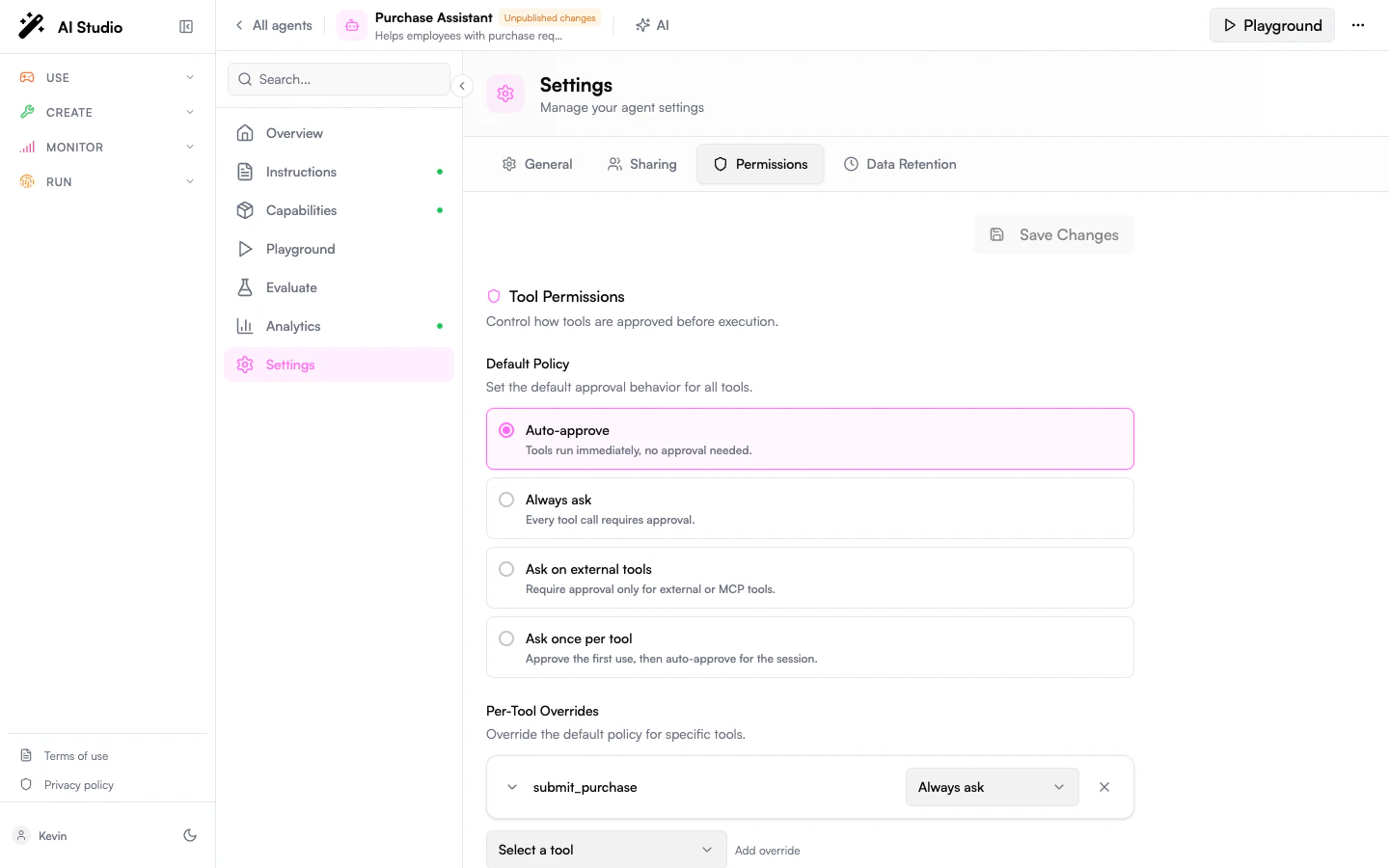
Per-tool overrides
Add an override when a single tool needs a different policy from the default. Each rule supports:- A tool (a function tool or an MCP server).
- A policy (one of the four above).
- Optional conditions: only pause when the call’s arguments match. Example: ask only when sending an email outside the company domain.
- Optional approvers: route the approval to designated reviewers instead of the chatting user.
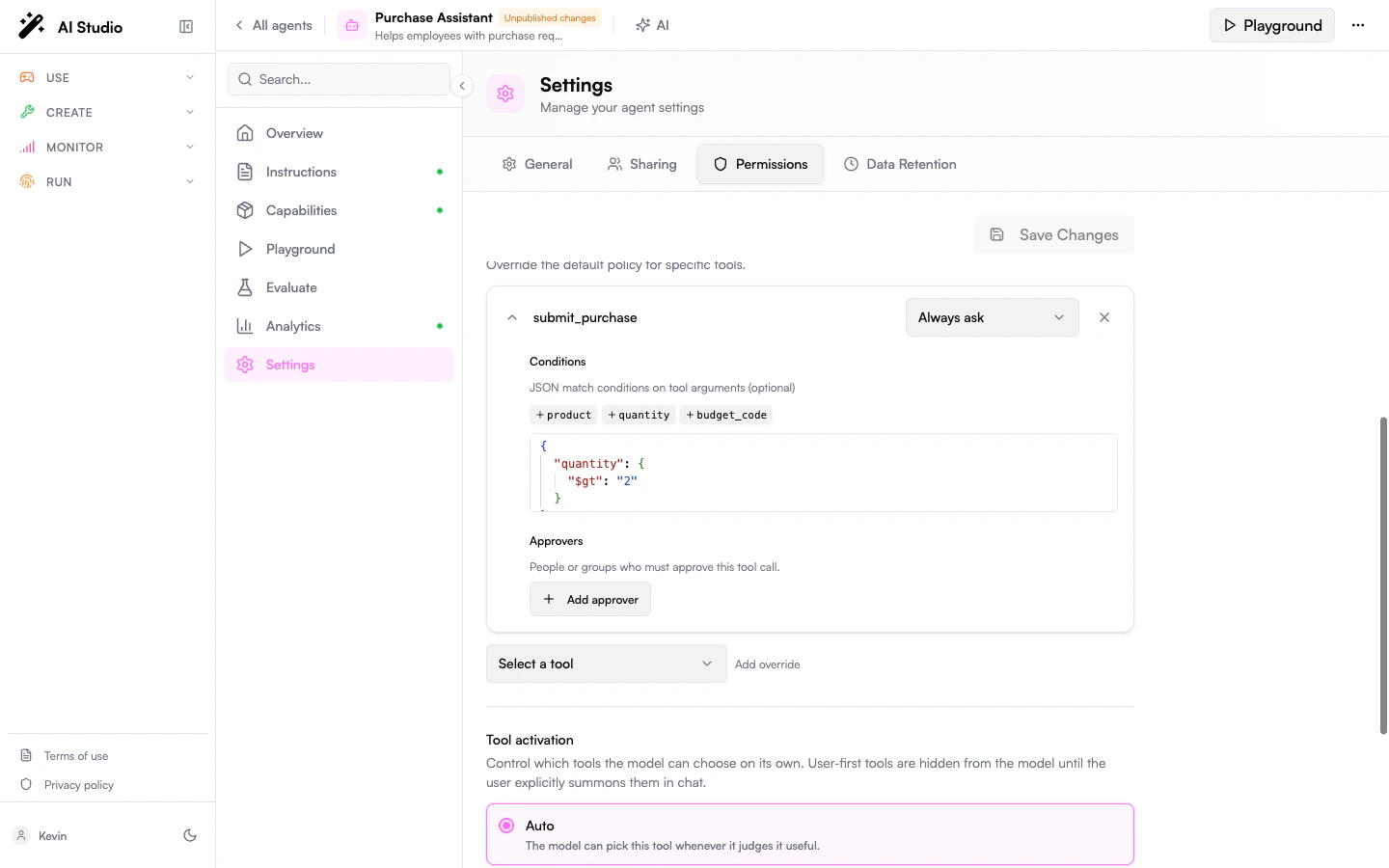
Designated approvers
approvers can be:
- Owner: the user who created the agent.
- User: a specific user.
- Group: anyone in the group.
Locking a whole MCP integration
A rule on an MCP server (e.g.{ tool: "github", policy: "always_ask" }) applies to every tool the server exposes: create_issue, update_issue, search_repos, … This matches how administrators usually think about integrations: gate it as a whole rather than enumerating its dynamic children.
ask_firstset on an MCP parent covers every child for the conversation: approvecreate_issueonce andsearch_reposruns without prompting.- A rule on a specific child name still wins over the parent rule, useful to lift a single child out of a restriction.
Composition with user-first activation
If the agent tries to call a user-first tool without being summoned, the call is silently blocked; it never reaches the approval gate.
Behavior reference
The “ask first” memory is per-conversation. Pending approvals survive page reloads; you can come back later and resolve. Decisions made by designated approvers are recorded by the platform so your team’s notification or audit tooling can react to them.FAQ
Can I require two approvers for the same call?
Can I require two approvers for the same call?
Not yet. The pending approval resolves as soon as one configured approver acts.
Does 'ask first' persist across conversations?
Does 'ask first' persist across conversations?
No. It’s per-conversation. A new conversation prompts again.
Reject vs Stop generating: what's the difference?
Reject vs Stop generating: what's the difference?
Reject tells the agent the specific call was refused; it can adapt or try something else. Stop generating halts the whole run.
Can I self-approve as the owner?
Can I self-approve as the owner?
Add
{ type: owner } to the rule’s approvers. When the chatting user is the owner, the approval is delivered to them.Does this apply to skills, guardrails, or file search?
Does this apply to skills, guardrails, or file search?
No. The approval gate applies to function tools and MCP tool calls.
Related
- User-First Tools: control whether the agent sees a tool at all.
- Custom Tools: the function tools you’ll most often want to gate.
- Capabilities: overview of all tool types.