Documentation Index Fetch the complete documentation index at: https://docs.prisme.ai/llms.txt
Use this file to discover all available pages before exploring further.
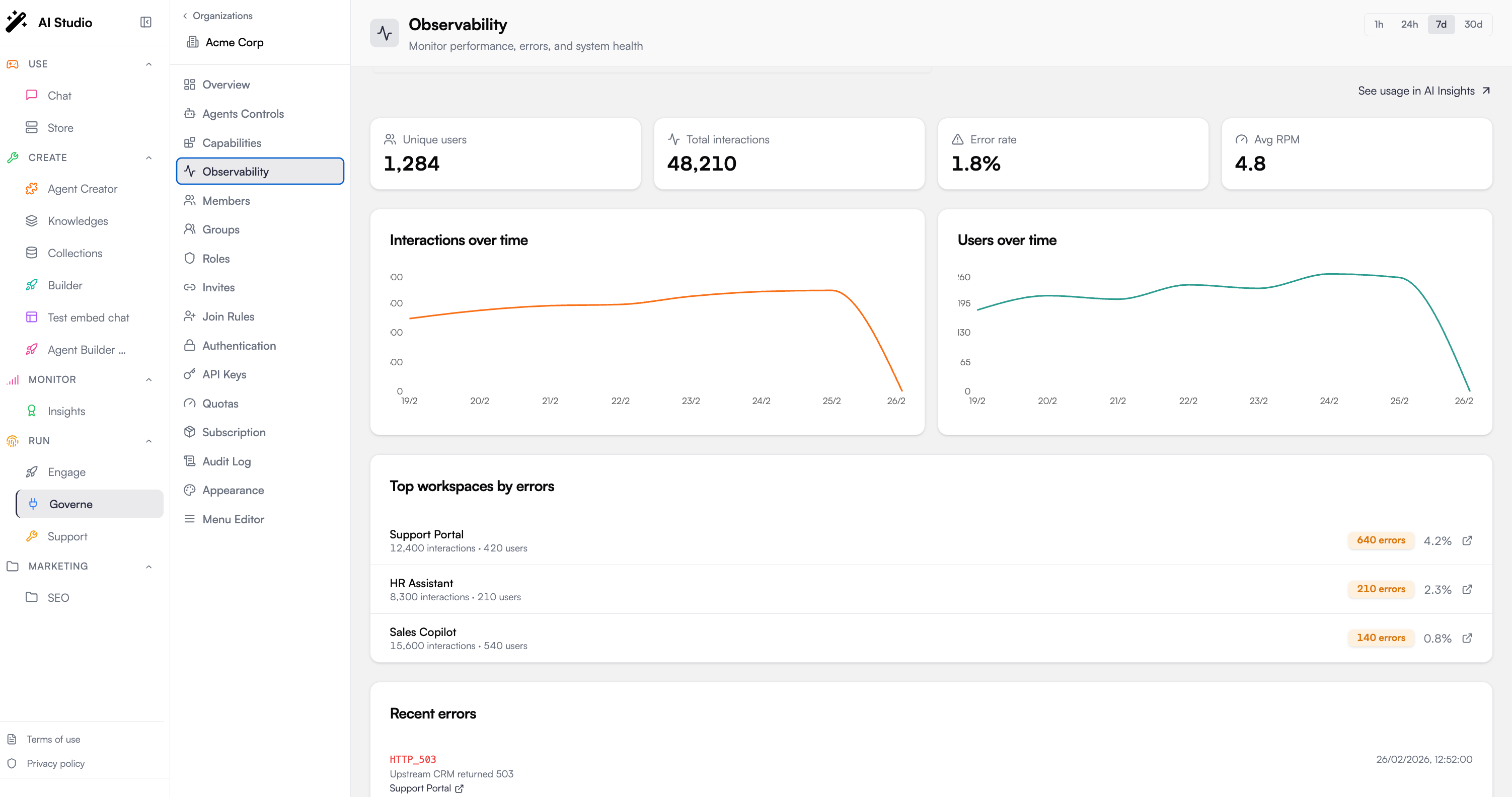
Observability provides deep visibility into your AI workspaces, tracking performance metrics, error rates, LLM costs, and detailed request traces. Access it from Observability in the Governe sidebar.
Dashboard Overview
The observability dashboard shows key metrics at a glance:
Metric Description Health Score 0-100 composite score based on errors, latency, and availability Total Executions Number of automation runs in the selected period Error Rate Percentage of executions that failed P95 Latency 95th percentile response time LLM Costs Total cost of LLM calls
Health Score
The health score combines multiple factors into a single 0-100 metric:
Status Score Range Color Healthy 90-100 Green Degraded 70-89 Yellow Critical 0-69 Red
Factor Breakdown
Factor Weight Calculation Error Rate 40% Lower error rate = higher score Latency 30% Lower latency = higher score Availability 30% Higher uptime = higher score
Latency Percentiles
Track response time distribution:
Percentile Description P50 Median response time P90 90% of requests faster than this P95 95% of requests faster than this P99 99% of requests faster than this
Slowest Automations
Identify bottlenecks by viewing automations ranked by average execution time.
Timeline View
Visualize performance over time with:
P95 latency trend (area chart)
Request volume (line overlay)
This helps correlate load spikes with latency increases.
Error Tracking
Error Distribution
View errors grouped by:
Type : InvalidExpressionSyntax, FetchError, TimeoutError, etc.
Automation : Which automations generate the most errors
Error Rate Trend
Track error rate changes over time to identify:
New bugs introduced
External service outages
Configuration issues
Recent Errors
View the latest errors with:
Timestamp
Error type and message
Automation name
Correlation ID (for tracing)
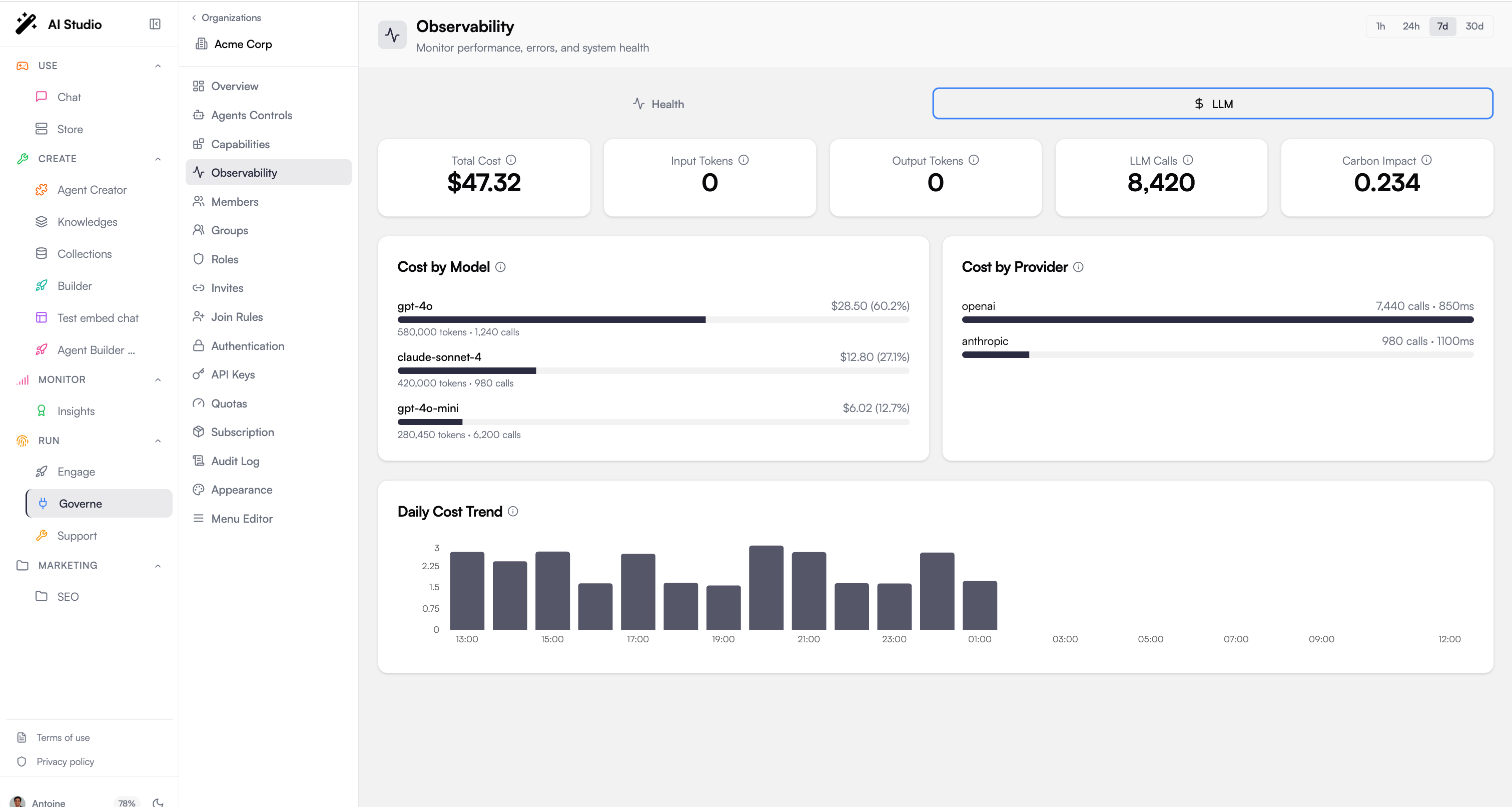
LLM Costs
Monitor AI model consumption and costs:
Cost Breakdown
Metric Description Total Calls Number of LLM API calls Total Cost Estimated cost in USD Total Tokens Input + output tokens consumed Carbon Impact Estimated CO2 emissions (kg)
By Model
See which models consume the most resources:
Model name
Number of calls
Cost percentage
Token count
By Automation
Identify which automations drive LLM costs:
Automation name
Call count
Relative usage
Cost Timeline
Track daily cost trends to:
Forecast monthly spend
Identify cost anomalies
Plan capacity
Request Traces
Trace individual requests through the entire execution flow.
Accessing Traces
From the Observability dashboard, click View Traces
Or click a correlation ID in the error list
Trace View
Each trace shows:
Element Description Summary Event count, duration, user info Timeline Waterfall view of all events Automations List of automations executed Errors Any errors encountered
Timeline Visualization
The waterfall chart shows:
Each automation as a horizontal bar
Start time offset from request start
Duration of each step
Errors highlighted in red
Dependency Graph
Visualize how automations call each other.
Graph View
Nodes : Automations and installed apps
Edges : Calls between components
Edge weight : Call frequency
Use Cases
Understand system architecture
Identify critical paths
Find orphaned automations
Anomaly Detection
Automatic detection of unusual patterns.
Anomaly Types
Type Description Error Spike Sudden increase in error rate Latency Spike Sudden increase in response time Traffic Spike Unusual increase in request volume Traffic Drop Unusual decrease in activity
Severity Levels
Severity Threshold Warning 2x baseline Critical 3x baseline
Configuration
Adjust detection sensitivity:
Low : Only alert on significant anomalies
Medium : Balanced detection (default)
High : Alert on minor deviations
Period Comparison
Compare metrics between two time periods.
How to Compare
Select current period dates
Select comparison period dates
View side-by-side metrics
Compared Metrics
Execution count
Error count and rate
Average and P95 latency
Unique users
Trend Indicators
Up : Increase > 5%
Down : Decrease > 5%
Stable : Within ±5%
Real-Time Feed
Monitor events as they happen.
Event Types
Type Description runtime.automations.executedAutomation completed runtime.fetch.completedHTTP fetch succeeded runtime.fetch.failedHTTP fetch failed runtime.llm.completedLLM call completed errorGeneral error event
Filtering
All : Show all events
Errors : Only error events
Executions : Only completion events
Time Window
Configure how far back to show events (default: 60 minutes).
Time Range Selection
All views support time range selection:
Period Description 1h Last hour 24h Last 24 hours 7d Last 7 days 30d Last 30 days Custom Specific date range
Platform administrators see a platform-wide summary:
Aggregate health score across all workspaces
Total platform requests
Combined LLM costs
Peak capacity usage
Best Practices
Set Baselines Establish normal performance baselines for comparison
Monitor Anomalies Enable anomaly detection for early warning
Track Costs Review LLM costs weekly to prevent surprises
Use Traces Investigate errors using correlation IDs
Troubleshooting
High Latency
High Error Rate
Cost Spikes
Check Slowest Automations for bottlenecks
Review the Timeline for load correlation
Examine traces for slow steps
Check external API response times
View Error Distribution by type
Check Recent Errors for patterns
Trace errors using correlation IDs
Review dependency health
Check By Model breakdown
Identify expensive automations
Review Cost Timeline for anomalies
Check for loops or inefficient prompts
Next Steps
Model Governance Control model access and costs
Audit Logs Track administrative changes