

Deploying Prisme.ai in a self-hosted environment involves multiple integrated components working seamlessly together. This document provides a detailed overview of the architecture to help you effectively plan and implement your deployment.Documentation Index
Fetch the complete documentation index at: https://docs.prisme.ai/llms.txt
Use this file to discover all available pages before exploring further.
Architectural Components
Prisme.ai is composed of several critical microservices and infrastructure components:Core Services
- API Gateway: Central access point securing and routing API requests.
- Workspace Service: Manages user-defined workspaces, permissions, and metadata.
- Event Service: Handles event-driven interactions and analytics.
- Runtime Service: Executes and scales AI agents dynamically.
- Console Service: Render the studio with AI products.
- Pages Service: Renders end-user pages and can scale separately if needed.
Extended Services
- Functions Service: Allows execution of user-defined JavaScript or Python scripts.
- Crawler Service: Indexes and manages external web document content.
- Search Service: Powers internal search capabilities (Redis Stack, Elasticsearch/OpenSearch).
- Authentication Service: Manages user authentication and supports OIDC and SAML.
Databases
Prisme.ai leverages multiple specialized databases:- MongoDB/PostgreSQL (structured data): Stores structured application data, users, roles, and permissions.
- Redis (scaling): Provides caching, real-time streaming, and message brokering.
- Elasticsearch/OpenSearch (Events Store): Stores and indexes document content and analytics data.
- Redis Stack/Elasticsearch/OpenSearch (Vector Store): Manages vectorized data for Knowledges applications.
File and Object Storage
- Filesystem: RWX-supported Kubernetes PVC for local file storage.
- Object Storage: Compatible with S3 and Azure Blob for scalable storage of uploads, models, and documents.
Deployment Patterns
Prisme.ai architecture supports several deployment configurations:Kubernetes Deployment
Recommended for scalable and resilient deployments:- Helm Charts: Simplify Kubernetes deployments with pre-configured Helm charts.
- Operators: Advanced Kubernetes management via custom operators for automated maintenance and scaling.
Docker Deployment
Ideal for smaller, development, or test environments:- Docker Compose: Manage local or small-scale deployments using Docker Compose.
Network and Security
Security and network architecture considerations:- Ingress Controller: Required for routing traffic to services.
- Firewall and Network Policies: Recommended to secure inter-service communications.
- TLS/SSL Certificates: Essential for secure external communication and internal service interaction.
High Availability and Scalability
Ensure service continuity and scalability:- Replica Sets: Deploy multiple instances of microservices for fault tolerance.
- Horizontal Pod Autoscaling (HPA): Automatically scale services based on workload.
- Persistent Storage: Use distributed file systems or cloud storage for high availability.
Logging and Monitoring
Critical for operational oversight:- Centralized Logging: Use logging systems like ELK or Prometheus/Grafana.
- Metrics and Alerting: Monitor system health, set alerts for critical thresholds.
Architecture Diagrams
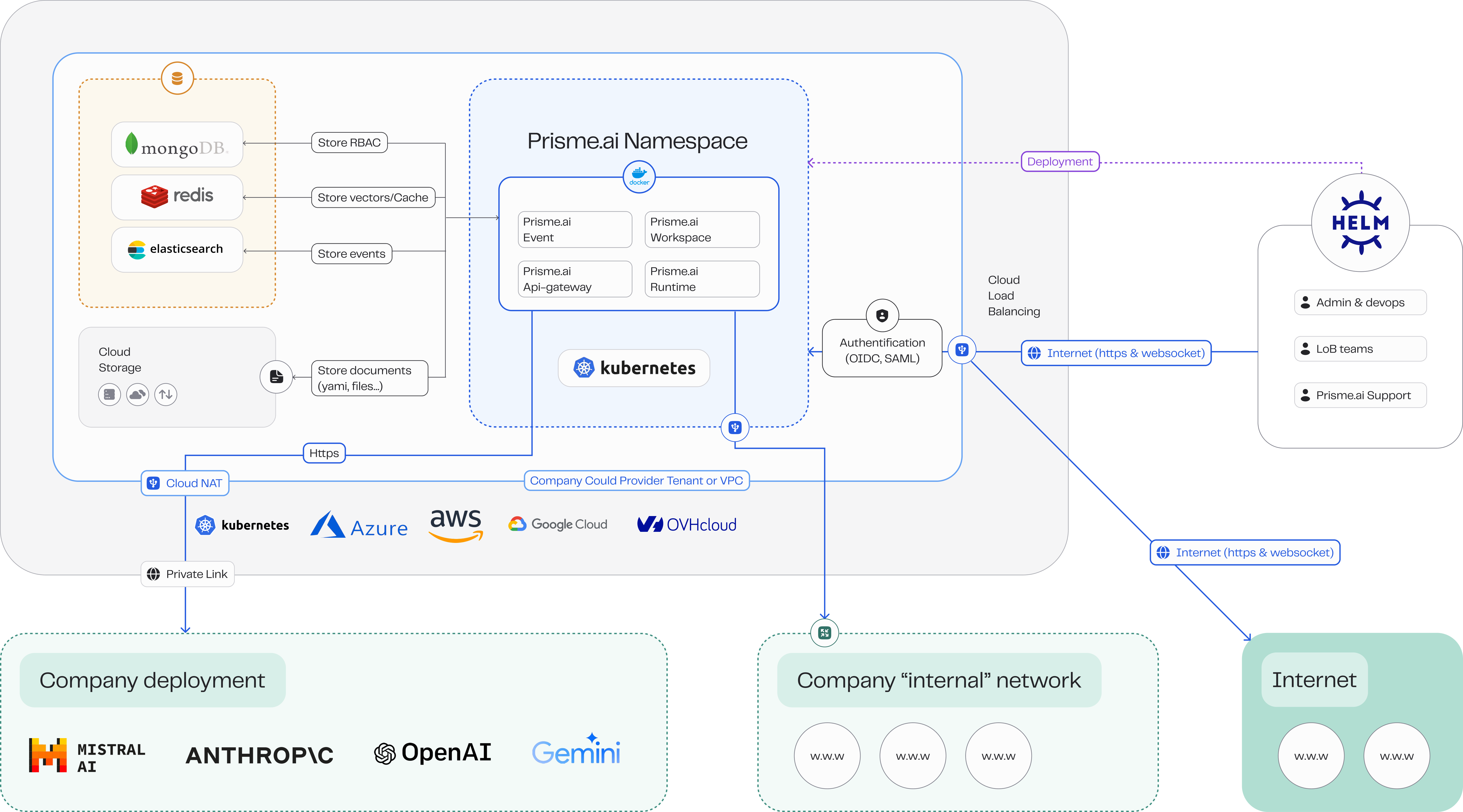
Request Technical Diagrams
Contact our Support Team for access to the complete set of draw.io technical architecture diagrams tailored to your specific deployment configuration.
Customized Data Flow Documentation
Our technical specialists can provide detailed data flow documentation customized to your specific use cases and implementation needs.
Next Steps
Cloud Providers
Explore deployment guides for AWS, Azure, GCP, and OpenShift.
Docker Deployment
Follow instructions for Docker-based deployments.
Kubernetes Deployment
Detailed guide for Kubernetes deployment and management.
Operations
Manage updates, backups, scaling, and troubleshooting.