> ## Documentation Index
> Fetch the complete documentation index at: https://docs.prisme.ai/llms.txt
> Use this file to discover all available pages before exploring further.
# Memories
> What your agents are learning about users — volume, type breakdown, and where the knowledge gaps are.
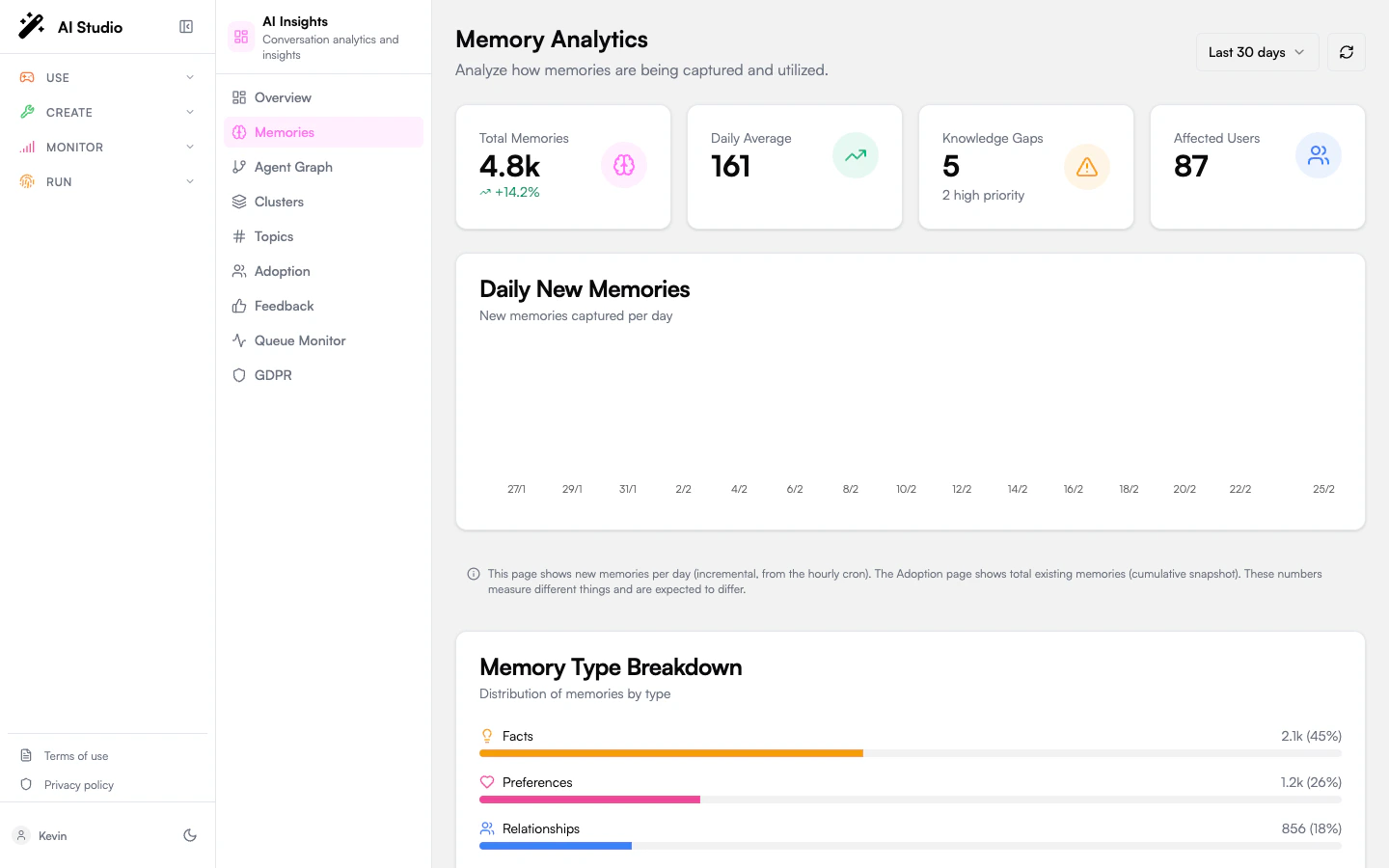
When an agent has memory enabled, it stores facts, preferences, and instructions across conversations so it can personalize replies. The **Memories** page in the organization view aggregates that store across the whole fleet.
 ## Period selector
A `7d / 30d / 90d` selector in the top-right scopes every chart and KPI on the page. The default is 30 days.
A refresh button next to it forces a re-fetch of the analytics.
## KPIs
| Card | What it means |
| ------------------ | ------------------------------------------------------------------------------------------------------------------------- |
| **Total Memories** | All memories captured in the period. Trend badge is the percentage change against the previous period of the same length. |
| **Daily Average** | Average new memories captured per day. |
| **Knowledge Gaps** | Total topics where users asked something the agent didn't know yet. The high-priority count is shown below. |
| **Affected Users** | Estimated number of distinct users who hit at least one knowledge gap. |
## Daily new memories chart
A bar chart showing how many memories were captured each day in the period. Use it to spot bursts (a feature launch, an incident) and lulls (an outage, a holiday).
## Type breakdown
Memories are tagged with a type by the capture pipeline:
| Type | What it stores |
| ----------------- | --------------------------------------------------------------------------------------------------- |
| **Facts** | Verifiable information about a user — role, location, customer ID, domain. |
| **Preferences** | What the user likes, dislikes, prefers — communication style, language, format. |
| **Relationships** | How the user relates to people, teams, or systems — manager, team members, key accounts. |
| **Instructions** | Standing orders the user has given — *"always summarize in three bullets"*, *"never use Markdown"*. |
The breakdown shows count and percentage per type, plotted as horizontal bars.
## Knowledge gaps
A gap is a topic users asked about repeatedly that the agent doesn't yet have a memory for. Each gap card shows:
* The topic name and a severity badge (**high**, **medium**, **low**).
* The number of occurrences and the number of distinct users affected.
* Up to five extracted keywords.
* A **suggested action** — usually "add a knowledge base entry covering X" or "extend the agent's instructions with Y".
Use the gaps list as a backlog: each high-severity gap is a concrete documentation, knowledge base, or instruction change to ship.
## Recommendations
A standalone card at the bottom lists priority-ordered actions the analytics pipeline derived from the gaps and the type distribution. Each entry has a priority badge (high / medium / low) and a short action string. These are advisory — the platform doesn't apply them automatically.
## Where to go next
Drill into specific topics, examples, and trend direction.
Personalization depth as part of the adoption picture.
## Period selector
A `7d / 30d / 90d` selector in the top-right scopes every chart and KPI on the page. The default is 30 days.
A refresh button next to it forces a re-fetch of the analytics.
## KPIs
| Card | What it means |
| ------------------ | ------------------------------------------------------------------------------------------------------------------------- |
| **Total Memories** | All memories captured in the period. Trend badge is the percentage change against the previous period of the same length. |
| **Daily Average** | Average new memories captured per day. |
| **Knowledge Gaps** | Total topics where users asked something the agent didn't know yet. The high-priority count is shown below. |
| **Affected Users** | Estimated number of distinct users who hit at least one knowledge gap. |
## Daily new memories chart
A bar chart showing how many memories were captured each day in the period. Use it to spot bursts (a feature launch, an incident) and lulls (an outage, a holiday).
## Type breakdown
Memories are tagged with a type by the capture pipeline:
| Type | What it stores |
| ----------------- | --------------------------------------------------------------------------------------------------- |
| **Facts** | Verifiable information about a user — role, location, customer ID, domain. |
| **Preferences** | What the user likes, dislikes, prefers — communication style, language, format. |
| **Relationships** | How the user relates to people, teams, or systems — manager, team members, key accounts. |
| **Instructions** | Standing orders the user has given — *"always summarize in three bullets"*, *"never use Markdown"*. |
The breakdown shows count and percentage per type, plotted as horizontal bars.
## Knowledge gaps
A gap is a topic users asked about repeatedly that the agent doesn't yet have a memory for. Each gap card shows:
* The topic name and a severity badge (**high**, **medium**, **low**).
* The number of occurrences and the number of distinct users affected.
* Up to five extracted keywords.
* A **suggested action** — usually "add a knowledge base entry covering X" or "extend the agent's instructions with Y".
Use the gaps list as a backlog: each high-severity gap is a concrete documentation, knowledge base, or instruction change to ship.
## Recommendations
A standalone card at the bottom lists priority-ordered actions the analytics pipeline derived from the gaps and the type distribution. Each entry has a priority badge (high / medium / low) and a short action string. These are advisory — the platform doesn't apply them automatically.
## Where to go next
Drill into specific topics, examples, and trend direction.
Personalization depth as part of the adoption picture.