> ## Documentation Index
> Fetch the complete documentation index at: https://docs.prisme.ai/llms.txt
> Use this file to discover all available pages before exploring further.
# Users
> The per-agent users table: everyone who used a given agent over the selected period, with interactions and messages.
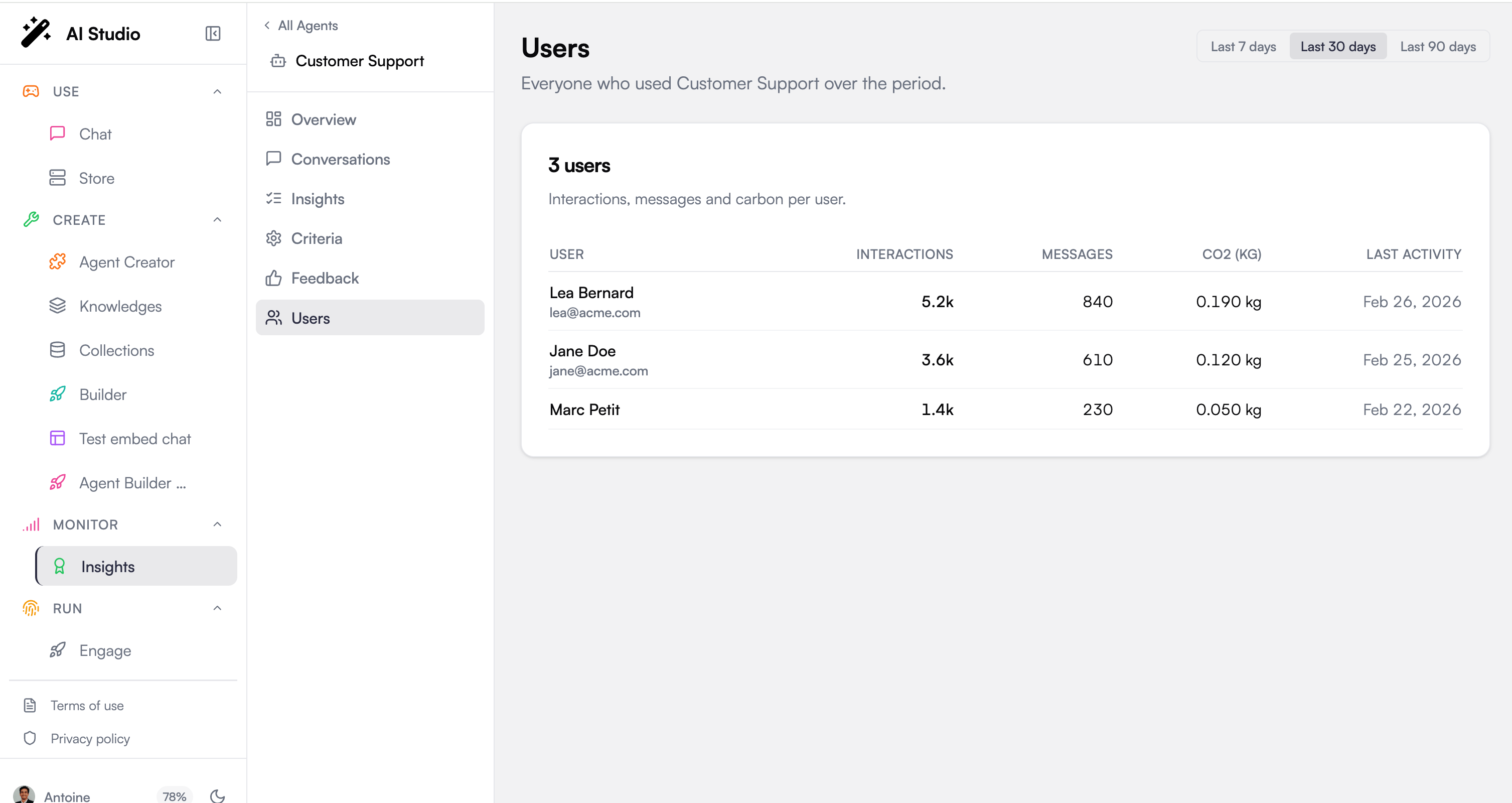
Users is the per-agent roster: everyone who used the selected agent over a period, with how much each of them used it. It answers *who is actually talking to this agent, and how heavily?*
This page is per-agent. It appears when an agent is selected, so it always reflects the one agent you are viewing, not the whole fleet. For organization-wide, chargeback-style consumption, use the per-user table on [Consumption](/products/ai-insights/consumption).
 ## Period selector
A period selector in the top-right scopes the table (for example the last 30 days). Changing the period reloads the roster for that window.
## The users table
The table header shows the number of users, and each row is one member who used the agent in the period:
| Column | What it shows |
| ----------------- | -------------------------------------------------------------------------------------------------------------------------------------------------------- |
| **User** | The member's name or email; when both are known, the email is shown under the name. |
| **Interactions** | The member's billable interactions with this agent over the period. See [Consumption](/products/ai-insights/consumption) for what an interaction counts. |
| **Messages** | Messages the member sent to the agent. Shown when message data is available. |
| **Last activity** | The date of the member's most recent activity with the agent. |
Some columns are conditional: **Messages** and the carbon column only appear when that data is present for the period, so a lighter environment may show fewer columns.
If no one has used the agent in the period, the page shows a "No user data yet" empty state.
## Where to go next
Organization-wide interactions, LLM requests, and per-user chargeback.
Segment users into Power, Regular, and Basic across the fleet.
## Period selector
A period selector in the top-right scopes the table (for example the last 30 days). Changing the period reloads the roster for that window.
## The users table
The table header shows the number of users, and each row is one member who used the agent in the period:
| Column | What it shows |
| ----------------- | -------------------------------------------------------------------------------------------------------------------------------------------------------- |
| **User** | The member's name or email; when both are known, the email is shown under the name. |
| **Interactions** | The member's billable interactions with this agent over the period. See [Consumption](/products/ai-insights/consumption) for what an interaction counts. |
| **Messages** | Messages the member sent to the agent. Shown when message data is available. |
| **Last activity** | The date of the member's most recent activity with the agent. |
Some columns are conditional: **Messages** and the carbon column only appear when that data is present for the period, so a lighter environment may show fewer columns.
If no one has used the agent in the period, the page shows a "No user data yet" empty state.
## Where to go next
Organization-wide interactions, LLM requests, and per-user chargeback.
Segment users into Power, Regular, and Basic across the fleet.