> ## Documentation Index
> Fetch the complete documentation index at: https://docs.prisme.ai/llms.txt
> Use this file to discover all available pages before exploring further.
# Subscriptions & Quotas
> Define plans, set usage limits, and keep your LLM spend under control
Subscriptions and quotas are how you keep usage, and cost, under control. A **subscription** is a plan attached to an organization: it defines the limits and the features that organization gets. **Quotas** are the live counters that enforce those limits in real time.
This matters most for **LLM cost**: an agent, an automation, or an integration calling the platform can consume a lot very quickly. Subscriptions let you put guardrails in place so that never turns into a surprise.
Everything here applies whether you run Prisme.ai self-hosted or use a hosted Governe workspace. If you self-host, you define your own plans and assign them to your own organizations.
## How it fits together
* A **plan** (subscription) is created once and can be reused by many organizations.
* Each **organization** points to one plan. Different organizations can run on different plans.
* The plan carries two kinds of limits:
* **Hard limits** (enforced): rate limits and budgets that actually block or slow requests when hit.
* **Soft allowances** (included): members, agents, interactions, storage. These are never blocked, they are simply tracked (and billed as overage if you charge back internally).
## Viewing an organization's plan
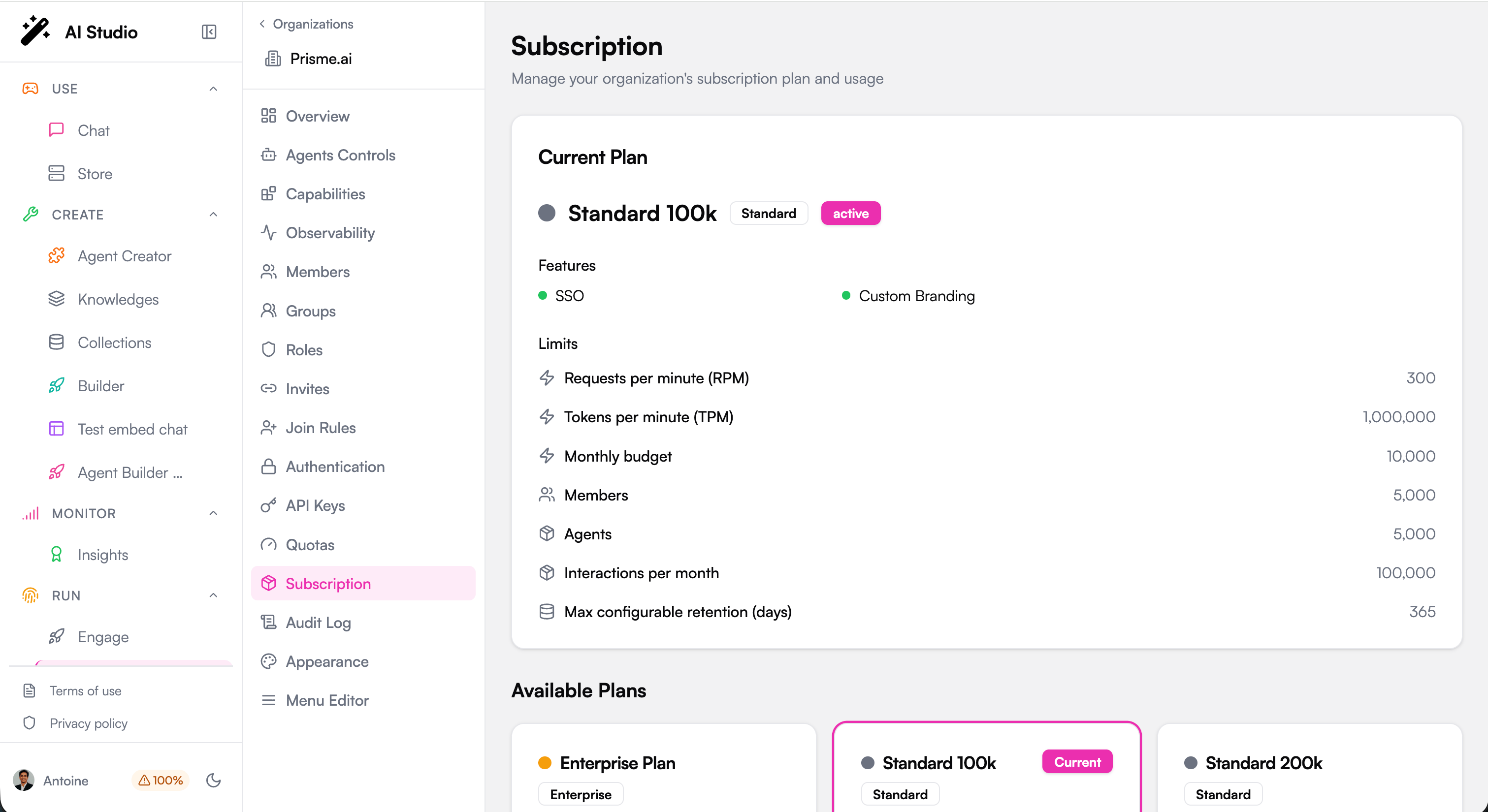
Go to **Subscription** in the organization sidebar to see the current plan, its limits and features, and the other plans available.
 ## Creating a plan
Platform administrators create plans from **Governe > Subscriptions > Create Subscription**.
## Creating a plan
Platform administrators create plans from **Governe > Subscriptions > Create Subscription**.
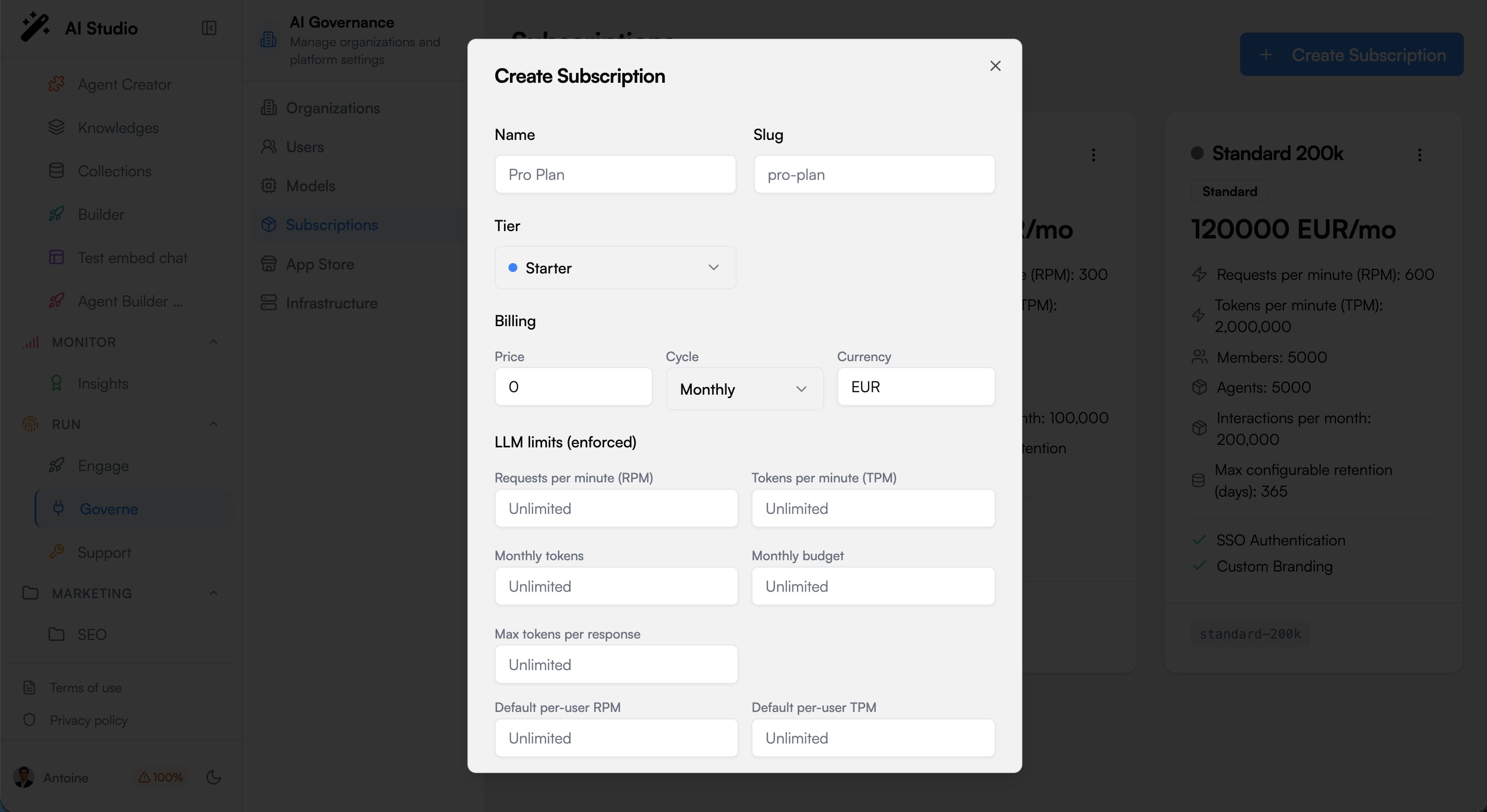 A plan has a name, a slug, a tier (Free, Starter, Pro, Enterprise, Custom), optional billing information, and the sections below.
### LLM limits (enforced)
These are the real guardrails. They apply on **every path**: chat with an agent, a direct call to the LLM gateway, or an automation triggered by an endpoint.
| Field | What it does | When to use it |
| ----------------------------- | ------------------------------------------------------------------ | ----------------------------------------------------- |
| **Requests per minute (RPM)** | Caps how many requests the whole organization can make each minute | Absorb bursts, block abuse |
| **Tokens per minute (TPM)** | Caps how many tokens per minute the organization can consume | The main lever to bound the burn rate |
| **RPM per user (default)** | Same cap, but applied to **each user individually** | Stop one person or one script from hogging everything |
| **TPM per user (default)** | Per-user token rate | The surgical lever against a single heavy consumer |
| **Monthly tokens** | A hard ceiling of tokens for the month | Predictable monthly usage |
| **Monthly budget** | A hard ceiling of cost for the month | The safety net against runaway spend |
| **Max tokens per response** | Suggested cap on the length of a single answer | Trim very long responses |
Rate limits (RPM/TPM) **slow** consumption, they do not stop a process. A capped job keeps running at the capped speed. The monthly budget is what puts a hard stop for the month.
### Allowed model tiers
Restrict which model tiers this plan may use: **Eco**, **Standard**, **Premium**. Leaving all unselected means every tier is allowed.
Use this to steer usage toward cheaper models. For a stricter, hard block on specific models, use the allowlist in [Model Governance](./model-governance).
### Included (overage billed, never blocked)
Allowances that are tracked but never block a request:
* **Members** and **Agents** included in the plan.
* **Interactions per month**: an interaction is any triggered usage (a message to an agent, a direct LLM call, an automation or workflow run).
* **Storage** for indexed content and conversations.
### Features and retention
* **Features**: SSO, Custom Branding, and other capabilities toggled per tier.
* **Max configurable retention (days)**: the longest data retention this plan allows. See [Retention](./retention).
## Watching usage in real time
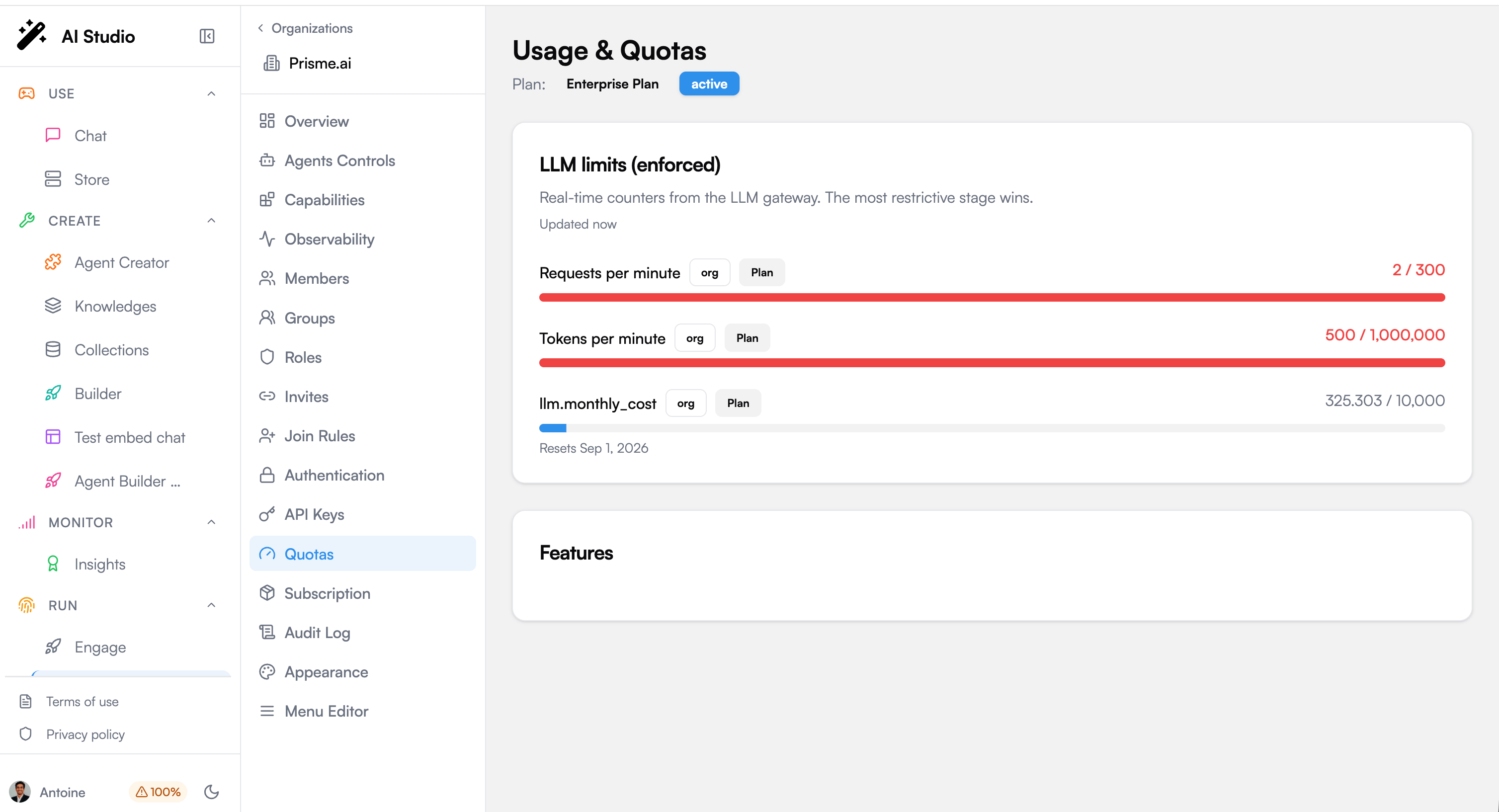
Go to **Quotas** (Usage & Quotas) in the organization sidebar. Each enforced limit shows a live counter and a progress bar. The most restrictive limit always wins.
A plan has a name, a slug, a tier (Free, Starter, Pro, Enterprise, Custom), optional billing information, and the sections below.
### LLM limits (enforced)
These are the real guardrails. They apply on **every path**: chat with an agent, a direct call to the LLM gateway, or an automation triggered by an endpoint.
| Field | What it does | When to use it |
| ----------------------------- | ------------------------------------------------------------------ | ----------------------------------------------------- |
| **Requests per minute (RPM)** | Caps how many requests the whole organization can make each minute | Absorb bursts, block abuse |
| **Tokens per minute (TPM)** | Caps how many tokens per minute the organization can consume | The main lever to bound the burn rate |
| **RPM per user (default)** | Same cap, but applied to **each user individually** | Stop one person or one script from hogging everything |
| **TPM per user (default)** | Per-user token rate | The surgical lever against a single heavy consumer |
| **Monthly tokens** | A hard ceiling of tokens for the month | Predictable monthly usage |
| **Monthly budget** | A hard ceiling of cost for the month | The safety net against runaway spend |
| **Max tokens per response** | Suggested cap on the length of a single answer | Trim very long responses |
Rate limits (RPM/TPM) **slow** consumption, they do not stop a process. A capped job keeps running at the capped speed. The monthly budget is what puts a hard stop for the month.
### Allowed model tiers
Restrict which model tiers this plan may use: **Eco**, **Standard**, **Premium**. Leaving all unselected means every tier is allowed.
Use this to steer usage toward cheaper models. For a stricter, hard block on specific models, use the allowlist in [Model Governance](./model-governance).
### Included (overage billed, never blocked)
Allowances that are tracked but never block a request:
* **Members** and **Agents** included in the plan.
* **Interactions per month**: an interaction is any triggered usage (a message to an agent, a direct LLM call, an automation or workflow run).
* **Storage** for indexed content and conversations.
### Features and retention
* **Features**: SSO, Custom Branding, and other capabilities toggled per tier.
* **Max configurable retention (days)**: the longest data retention this plan allows. See [Retention](./retention).
## Watching usage in real time
Go to **Quotas** (Usage & Quotas) in the organization sidebar. Each enforced limit shows a live counter and a progress bar. The most restrictive limit always wins.
 | Threshold | Meaning |
| -------------------- | -------- |
| 0 to 79 percent | Normal |
| 80 to 94 percent | Warning |
| 95 percent and above | Critical |
### What happens when a limit is reached
The behaviour depends on the quota policy set in [Model Governance](./model-governance#quota-policy):
| Policy | Behaviour |
| ------------------ | ------------------------------------------------------- |
| **Hard block** | The request fails with a quota or rate-limit error |
| **Soft downgrade** | The request automatically falls back to a cheaper model |
| **Rate limited** | The request fails with a retry-after delay |
Soft downgrade is often the best default: it protects your budget without breaking the user experience.
***
## Keeping LLM cost under control
A subscription is your cost control panel. Here is how to think about it.
### The two dials
1. **Bound the speed** with **TPM** (and TPM per user). Tokens are what cost money, so a tokens-per-minute cap is the single most effective way to bound how much can be spent in any period. Lower it and the maximum possible daily spend drops with it.
2. **Cap the total** with the **Monthly budget**. This is the hard stop for the month, whatever happens.
Combine both: TPM stops any single hour from getting out of hand, the monthly budget stops the month from getting out of hand.
### Prefer cheaper models by default
Restrict **Allowed model tiers** to Eco (and Standard) for general usage, and reserve Premium for the plans or teams that truly need it. Or enable **soft downgrade** so overflow automatically shifts to a cheaper model instead of failing.
### One plan per organization, tuned to the team
Because a plan is attached per organization, you can give a heavy team a larger plan and a light team a smaller one. Their budgets are fully isolated: one team overspending never affects another.
## Handling a heavy consumer
The most common cost surprise is not the crowd. It is a **single automated integration** that calls the platform directly (outside the chat) and keeps running day and night. Left unchecked, it can consume a large amount continuously.
Use [Observability](./observability) to see cost and usage by organization and by user. A steady, round-the-clock consumer that never sleeps is almost always an automation or an integration, not a person.
Set **TPM per user** low enough that even running non-stop, that user's maximum consumption stays acceptable. This caps the individual without throttling the whole organization.
Set a **Monthly budget** on the organization as the backstop.
Rate limits slow a runaway, they do not stop it. To stop it immediately, **revoke the API key or access token** it uses (see API Keys in the organization sidebar).
A newly changed limit applies **immediately** to chat sessions. For a long-lived direct-API integration, the new limit can take up to an hour to take effect on an already-open session, unless you also change something on that user's membership (for example their role), which refreshes it right away. Revoking the key is always immediate.
## Worked example: 10,000 collaborators
You are rolling out AI to 10,000 people. How do you size this without either blocking everyone or leaving the door open to runaway cost?
**The reflection first.** Ten thousand people almost never means ten thousand at once. Real concurrency is usually a small fraction, so you size the **organization-level** RPM and TPM for the realistic peak, not for the headcount. The real risk is rarely the crowd: it is a **single script or integration** that loops. So the per-user caps and the monthly budget matter more than the raw org numbers. And you start conservative, watch the Quotas gauges, then loosen.
Three ways to structure it:
**Simplest.** One organization, one plan.
* Generous **org RPM/TPM** for the realistic peak.
* Tight **per-user RPM/TPM** so no single person or script can run away.
* A **Monthly budget** as the hard ceiling.
* Model tiers limited to **Eco/Standard**, Premium off (or soft downgrade on).
Best when the population is fairly uniform. Least to manage.
**Isolated budgets.** Create a separate organization per business unit (support, engineering, sales, and so on), each with its own plan.
* Heavy teams get a bigger plan, light teams a smaller one.
* One team's overuse never touches another's budget.
* Clear per-team reporting.
Best for large, heterogeneous populations where you want per-team accountability.
**Fine-grained, one org.** Keep a single organization but differentiate by role.
* Power users get higher per-user limits, occasional users lower ones.
* Occasional users default to **Eco** models, power users to Standard/Premium.
Best when you want granularity without creating many organizations.
A common landing point is **B for the big picture** (a plan per major team) combined with **C inside each** (roles tuned per user), with a **Monthly budget on every organization** as the universal safety net.
## Next steps
Allowlists, default models, quota policy and downgrade rules
Track cost and usage by organization and user
Members, roles and API keys
The immutable trail of administrative actions
## Related topics
- [Audit Logs](/products/ai-governance/audit.md)
- [Model Governance](/products/ai-governance/model-governance.md)
- [Overview](/products/ai-governance/overview.md)
- [Account Setup and Configuration](/get-started/account-setup.md)
- [Building a Multi-Agent Orchestrator (A2A)](/resources/tutorials/multi-agent-orchestration.md)
| Threshold | Meaning |
| -------------------- | -------- |
| 0 to 79 percent | Normal |
| 80 to 94 percent | Warning |
| 95 percent and above | Critical |
### What happens when a limit is reached
The behaviour depends on the quota policy set in [Model Governance](./model-governance#quota-policy):
| Policy | Behaviour |
| ------------------ | ------------------------------------------------------- |
| **Hard block** | The request fails with a quota or rate-limit error |
| **Soft downgrade** | The request automatically falls back to a cheaper model |
| **Rate limited** | The request fails with a retry-after delay |
Soft downgrade is often the best default: it protects your budget without breaking the user experience.
***
## Keeping LLM cost under control
A subscription is your cost control panel. Here is how to think about it.
### The two dials
1. **Bound the speed** with **TPM** (and TPM per user). Tokens are what cost money, so a tokens-per-minute cap is the single most effective way to bound how much can be spent in any period. Lower it and the maximum possible daily spend drops with it.
2. **Cap the total** with the **Monthly budget**. This is the hard stop for the month, whatever happens.
Combine both: TPM stops any single hour from getting out of hand, the monthly budget stops the month from getting out of hand.
### Prefer cheaper models by default
Restrict **Allowed model tiers** to Eco (and Standard) for general usage, and reserve Premium for the plans or teams that truly need it. Or enable **soft downgrade** so overflow automatically shifts to a cheaper model instead of failing.
### One plan per organization, tuned to the team
Because a plan is attached per organization, you can give a heavy team a larger plan and a light team a smaller one. Their budgets are fully isolated: one team overspending never affects another.
## Handling a heavy consumer
The most common cost surprise is not the crowd. It is a **single automated integration** that calls the platform directly (outside the chat) and keeps running day and night. Left unchecked, it can consume a large amount continuously.
Use [Observability](./observability) to see cost and usage by organization and by user. A steady, round-the-clock consumer that never sleeps is almost always an automation or an integration, not a person.
Set **TPM per user** low enough that even running non-stop, that user's maximum consumption stays acceptable. This caps the individual without throttling the whole organization.
Set a **Monthly budget** on the organization as the backstop.
Rate limits slow a runaway, they do not stop it. To stop it immediately, **revoke the API key or access token** it uses (see API Keys in the organization sidebar).
A newly changed limit applies **immediately** to chat sessions. For a long-lived direct-API integration, the new limit can take up to an hour to take effect on an already-open session, unless you also change something on that user's membership (for example their role), which refreshes it right away. Revoking the key is always immediate.
## Worked example: 10,000 collaborators
You are rolling out AI to 10,000 people. How do you size this without either blocking everyone or leaving the door open to runaway cost?
**The reflection first.** Ten thousand people almost never means ten thousand at once. Real concurrency is usually a small fraction, so you size the **organization-level** RPM and TPM for the realistic peak, not for the headcount. The real risk is rarely the crowd: it is a **single script or integration** that loops. So the per-user caps and the monthly budget matter more than the raw org numbers. And you start conservative, watch the Quotas gauges, then loosen.
Three ways to structure it:
**Simplest.** One organization, one plan.
* Generous **org RPM/TPM** for the realistic peak.
* Tight **per-user RPM/TPM** so no single person or script can run away.
* A **Monthly budget** as the hard ceiling.
* Model tiers limited to **Eco/Standard**, Premium off (or soft downgrade on).
Best when the population is fairly uniform. Least to manage.
**Isolated budgets.** Create a separate organization per business unit (support, engineering, sales, and so on), each with its own plan.
* Heavy teams get a bigger plan, light teams a smaller one.
* One team's overuse never touches another's budget.
* Clear per-team reporting.
Best for large, heterogeneous populations where you want per-team accountability.
**Fine-grained, one org.** Keep a single organization but differentiate by role.
* Power users get higher per-user limits, occasional users lower ones.
* Occasional users default to **Eco** models, power users to Standard/Premium.
Best when you want granularity without creating many organizations.
A common landing point is **B for the big picture** (a plan per major team) combined with **C inside each** (roles tuned per user), with a **Monthly budget on every organization** as the universal safety net.
## Next steps
Allowlists, default models, quota policy and downgrade rules
Track cost and usage by organization and user
Members, roles and API keys
The immutable trail of administrative actions
## Related topics
- [Audit Logs](/products/ai-governance/audit.md)
- [Model Governance](/products/ai-governance/model-governance.md)
- [Overview](/products/ai-governance/overview.md)
- [Account Setup and Configuration](/get-started/account-setup.md)
- [Building a Multi-Agent Orchestrator (A2A)](/resources/tutorials/multi-agent-orchestration.md)