> ## Documentation Index
> Fetch the complete documentation index at: https://docs.prisme.ai/llms.txt
> Use this file to discover all available pages before exploring further.
# Help Agents
> Embed contextual assistant agents in platform surfaces and govern them centrally from Governe
Help agents are contextual assistants embedded directly in a platform surface. On a surface that has one, users see an **Ask anything…** panel that answers questions and runs quick actions in the context of that page — creating an agent from the Agent Creator, debugging a flow in the Builder, or getting started from Chat.
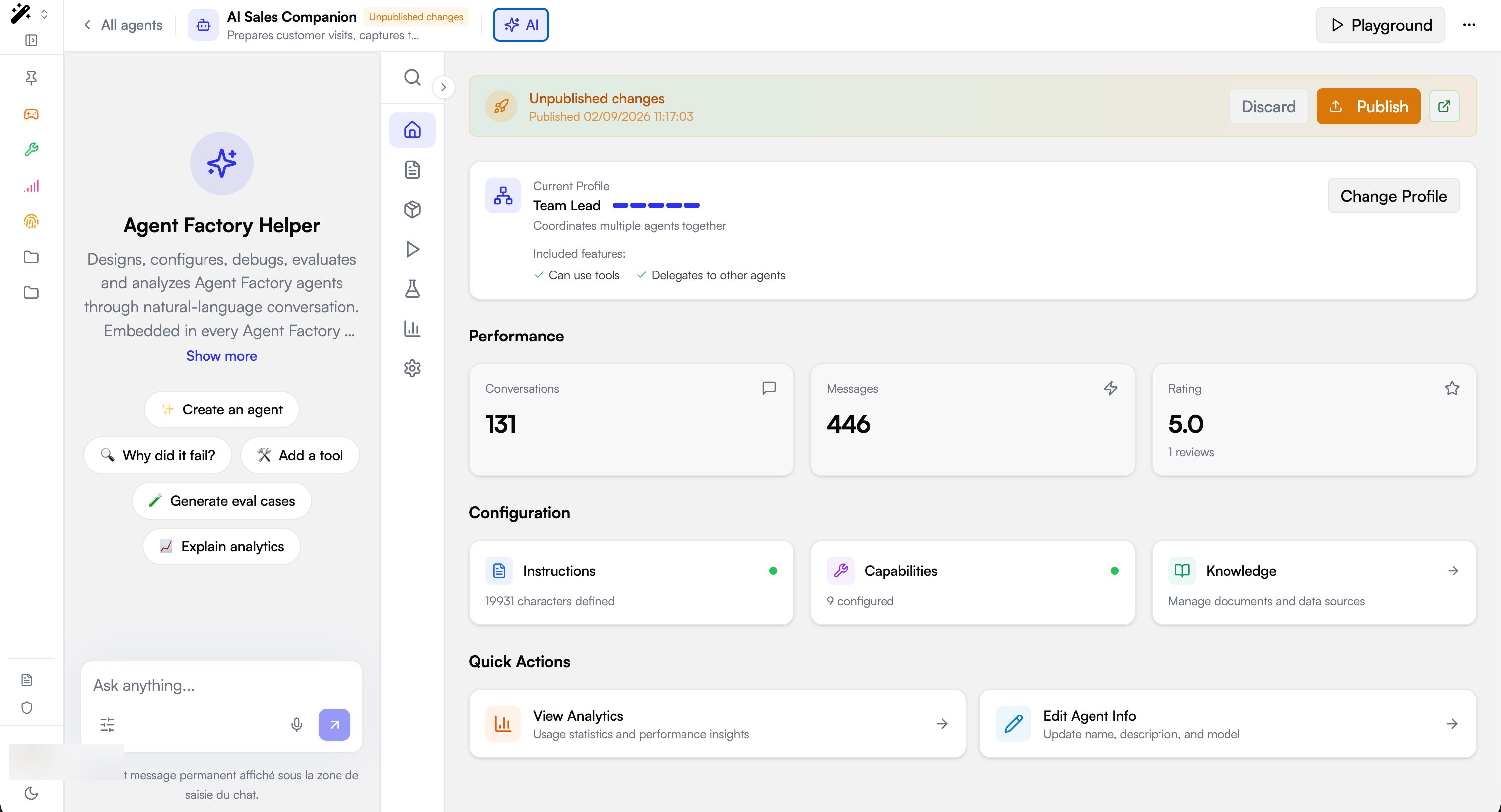 Each help agent is an ordinary [Agent Factory](/products/ai-builder/overview) agent that Governe **binds to a surface** through the navigation. Because the binding lives in Governe, the same two-level model as the rest of the platform applies: the platform provides shared helpers once, and each organization can add or replace helpers within its own navigation.
## Default help agents
New organizations receive three help agents, provisioned during onboarding and visible in **Governe → Menu Editor** on the matching navigation item:
| Slug | Surface | Route | Provisioning |
| - | - | - | - |
| `home-helper` | Chat | `/apps/secure-chat` | Per-organization — a new agent is created for each org |
| `agent-factory-helper` | Agent Creator | `/apps/agent-factory` | Platform-wide — one shared agent reused in every org |
| `builder-helper` | Builder | `/builder` | Platform-wide — one shared agent reused in every org |
Platform-wide helpers live in a dedicated platform workspace, so the same agent id resolves in every organization. The Chat home helper is organization-specific: each organization gets its own, so it can be tailored without affecting other tenants.
More help agents will be added over time, and the same mechanism can bind a helper to any surface by its slug. The list above is the current default set, not a fixed limit.
## How a help agent is bound
A help agent is a **feature** attached to a navigation item. Every item in the [Menu Editor](/products/ai-governance/platform-customization#menu-editor) can carry one or more features; a feature of type `agent` turns the item's surface into a host for that assistant. Items that host one show a **feature** badge in the editor.
Each help agent is an ordinary [Agent Factory](/products/ai-builder/overview) agent that Governe **binds to a surface** through the navigation. Because the binding lives in Governe, the same two-level model as the rest of the platform applies: the platform provides shared helpers once, and each organization can add or replace helpers within its own navigation.
## Default help agents
New organizations receive three help agents, provisioned during onboarding and visible in **Governe → Menu Editor** on the matching navigation item:
| Slug | Surface | Route | Provisioning |
| - | - | - | - |
| `home-helper` | Chat | `/apps/secure-chat` | Per-organization — a new agent is created for each org |
| `agent-factory-helper` | Agent Creator | `/apps/agent-factory` | Platform-wide — one shared agent reused in every org |
| `builder-helper` | Builder | `/builder` | Platform-wide — one shared agent reused in every org |
Platform-wide helpers live in a dedicated platform workspace, so the same agent id resolves in every organization. The Chat home helper is organization-specific: each organization gets its own, so it can be tailored without affecting other tenants.
More help agents will be added over time, and the same mechanism can bind a helper to any surface by its slug. The list above is the current default set, not a fixed limit.
## How a help agent is bound
A help agent is a **feature** attached to a navigation item. Every item in the [Menu Editor](/products/ai-governance/platform-customization#menu-editor) can carry one or more features; a feature of type `agent` turns the item's surface into a host for that assistant. Items that host one show a **feature** badge in the editor.
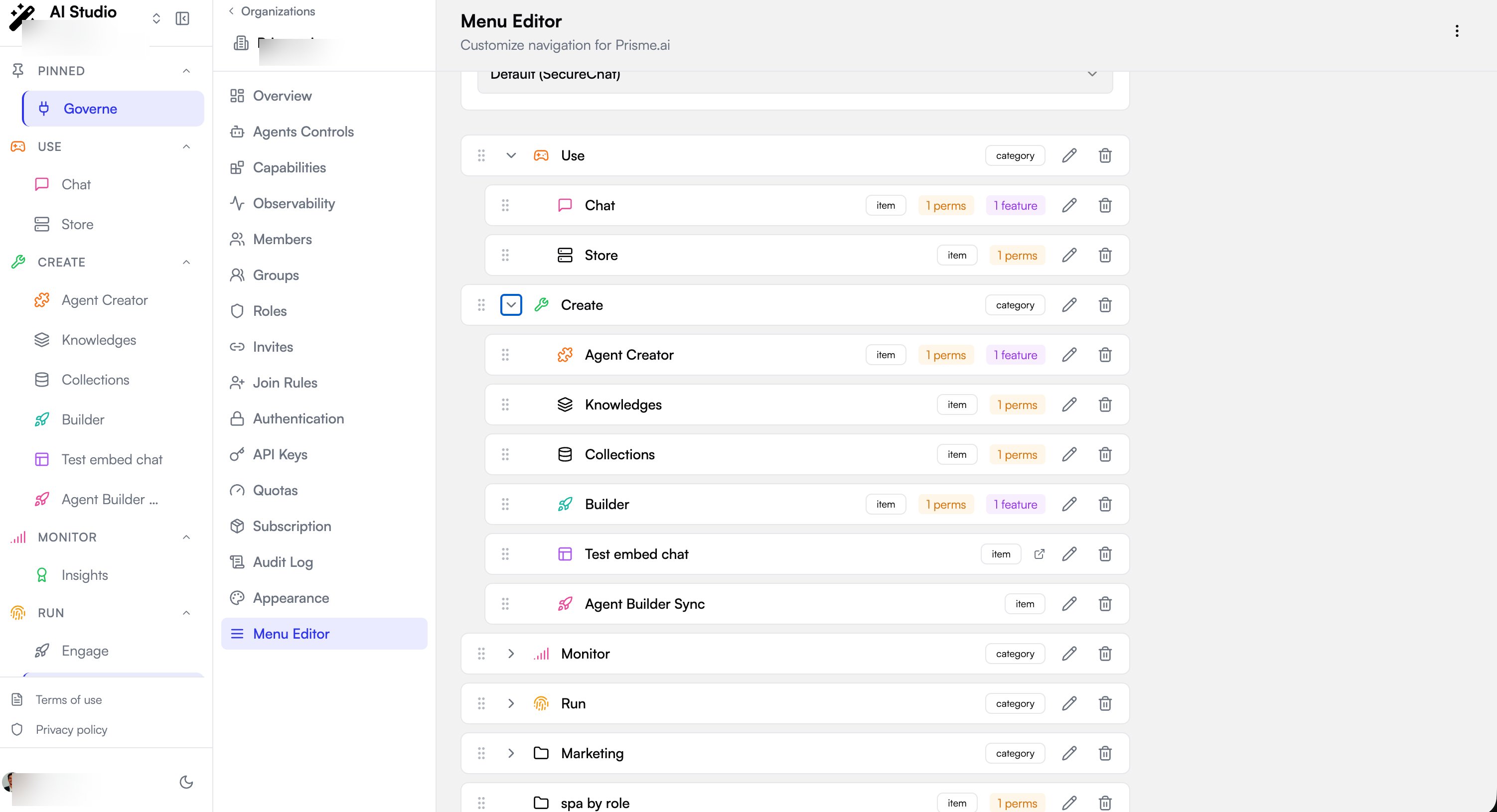 The platform resolves the binding by **slug**: the surface asks for a feature slug (for example `builder-helper`), reads the bound `agentId`, fetches that agent's full record, and renders it in the embedded assistant panel. The panel's quick-action buttons come from the agent's own conversation starters, so changing the agent changes the assistant everywhere it is bound.
## Configure a help agent
Configuring help agents requires access to **Governe → Menu Editor** for the organization. Navigation is an organization-level setting: changes apply to every member of that organization.
The platform resolves the binding by **slug**: the surface asks for a feature slug (for example `builder-helper`), reads the bound `agentId`, fetches that agent's full record, and renders it in the embedded assistant panel. The panel's quick-action buttons come from the agent's own conversation starters, so changing the agent changes the assistant everywhere it is bound.
## Configure a help agent
Configuring help agents requires access to **Governe → Menu Editor** for the organization. Navigation is an organization-level setting: changes apply to every member of that organization.
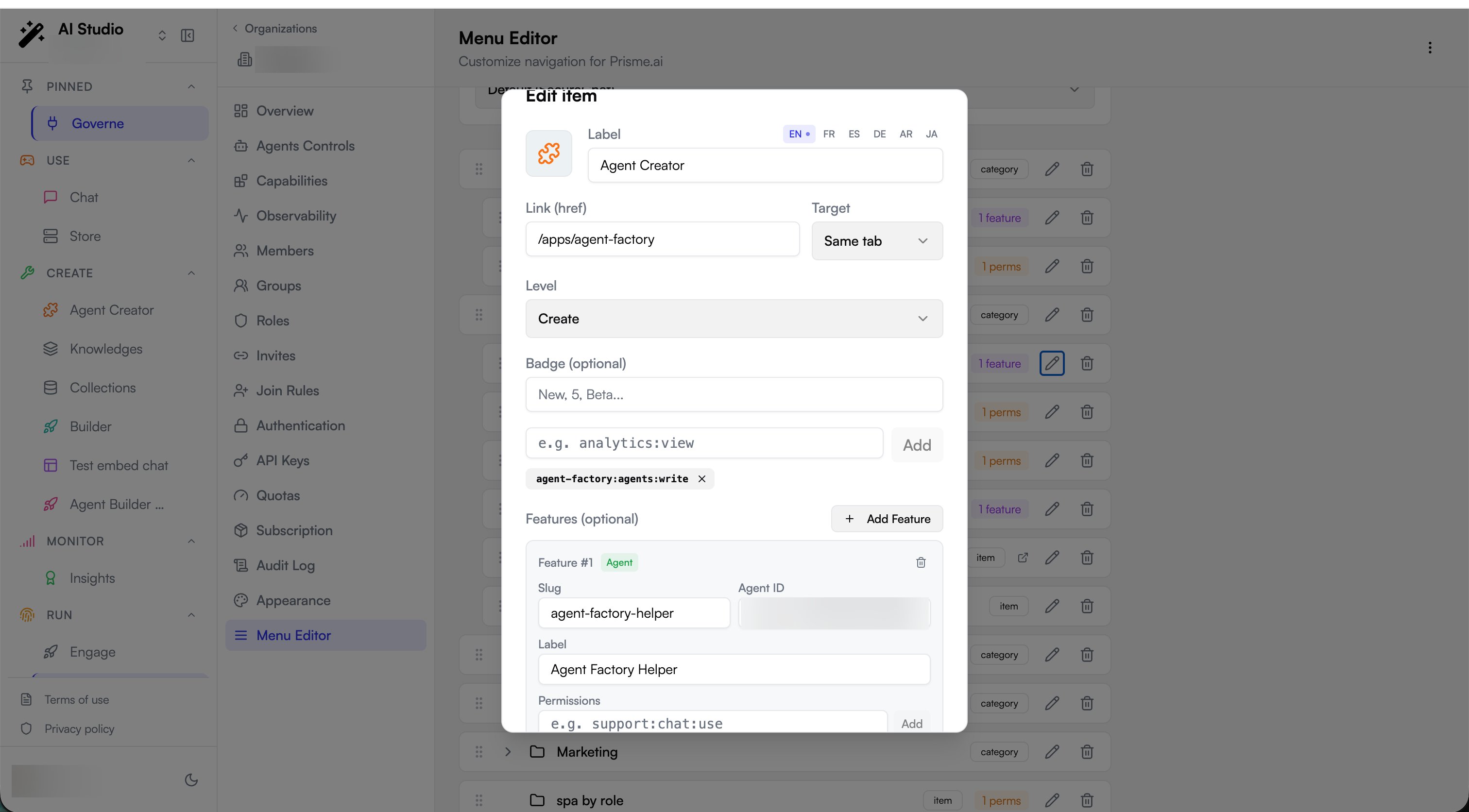 Go to **Governe → Menu Editor**.
Find the item whose surface should host the assistant (for example **Builder**) and open it with the edit (pencil) action. A help agent must hang on an item that links to the surface where it should appear.
In **Features (optional)**, select **Add Feature**. Keep the feature type set to **Agent**.
Set the four fields:
| Field | Required | Description |
| - | - | - |
| **Slug** | Yes | Stable identifier the surface uses to look up the assistant (e.g. `builder-helper`). Must match the slug the surface requests. |
| **Agent ID** | Yes | The Agent Factory agent that powers the assistant (e.g. `agent_…`). |
| **Label** | Yes | Display name shown in the assistant panel. |
| **Permissions** | No | Optional permission scopes for the feature. Who sees the surface and its assistant is governed by the item's own **Permissions**. |
Select **Save Changes**. The navigation item now shows a **feature** badge, and users on that surface see the assistant.
### Verify
1. Open the surface the item links to (for example the Builder at `/builder`).
2. Confirm the **Ask anything…** assistant panel appears with the **Label** you set and the agent's quick actions.
3. If the panel does not appear, confirm the feature **Slug** matches the one the surface requests, the **Agent ID** resolves to an agent the user can reach, and the user has permission to see the navigation item itself (items are hidden from users who lack the item's own `permissions`).
## API configuration
Help agents are stored in the organization's `navigation` object, as a `features` array on the relevant menu item:
```bash theme={null}
curl -X PATCH "https://api.prisme.ai/v2/orgs/{orgSlug}" \
-H "Authorization: Bearer $TOKEN" \
-H "Content-Type: application/json" \
-d '{
"navigation": {
"menu": [
{
"id": "item-builder",
"type": "item",
"label": { "en": "Builder" },
"href": "/builder",
"permissions": ["builder:*"],
"features": [
{
"type": "agent",
"slug": "builder-helper",
"label": { "en": "Builder Helper" },
"agentId": "agent_xxxxxxxxxxxxxxxx"
}
]
}
]
}
}'
```
Feature shape:
| Field | Type | Notes |
| - | - | - |
| `type` | `"agent"` \| `"template"` | Defaults to `"agent"` when omitted (backward compatibility). |
| `slug` | string | Looked up by the hosting surface. |
| `label` | string or localized object | Display name. |
| `agentId` | string | Required when `type` is `"agent"`. |
| `permissions` | string\[] | Optional. |
## Template features
The same `features` mechanism also carries `template` features (`type: "template"` with a `templateId`) rather than an agent id. These surface [workspace templates](/products/ai-governance/workspace-templates) on a navigation item instead of an assistant. A single item can mix both: an agent feature for its assistant and template features for its quick-create entries.
This documentation is built and hosted on [Mintlify](https://mintlify.com), a developer documentation platform.
Go to **Governe → Menu Editor**.
Find the item whose surface should host the assistant (for example **Builder**) and open it with the edit (pencil) action. A help agent must hang on an item that links to the surface where it should appear.
In **Features (optional)**, select **Add Feature**. Keep the feature type set to **Agent**.
Set the four fields:
| Field | Required | Description |
| - | - | - |
| **Slug** | Yes | Stable identifier the surface uses to look up the assistant (e.g. `builder-helper`). Must match the slug the surface requests. |
| **Agent ID** | Yes | The Agent Factory agent that powers the assistant (e.g. `agent_…`). |
| **Label** | Yes | Display name shown in the assistant panel. |
| **Permissions** | No | Optional permission scopes for the feature. Who sees the surface and its assistant is governed by the item's own **Permissions**. |
Select **Save Changes**. The navigation item now shows a **feature** badge, and users on that surface see the assistant.
### Verify
1. Open the surface the item links to (for example the Builder at `/builder`).
2. Confirm the **Ask anything…** assistant panel appears with the **Label** you set and the agent's quick actions.
3. If the panel does not appear, confirm the feature **Slug** matches the one the surface requests, the **Agent ID** resolves to an agent the user can reach, and the user has permission to see the navigation item itself (items are hidden from users who lack the item's own `permissions`).
## API configuration
Help agents are stored in the organization's `navigation` object, as a `features` array on the relevant menu item:
```bash theme={null}
curl -X PATCH "https://api.prisme.ai/v2/orgs/{orgSlug}" \
-H "Authorization: Bearer $TOKEN" \
-H "Content-Type: application/json" \
-d '{
"navigation": {
"menu": [
{
"id": "item-builder",
"type": "item",
"label": { "en": "Builder" },
"href": "/builder",
"permissions": ["builder:*"],
"features": [
{
"type": "agent",
"slug": "builder-helper",
"label": { "en": "Builder Helper" },
"agentId": "agent_xxxxxxxxxxxxxxxx"
}
]
}
]
}
}'
```
Feature shape:
| Field | Type | Notes |
| - | - | - |
| `type` | `"agent"` \| `"template"` | Defaults to `"agent"` when omitted (backward compatibility). |
| `slug` | string | Looked up by the hosting surface. |
| `label` | string or localized object | Display name. |
| `agentId` | string | Required when `type` is `"agent"`. |
| `permissions` | string\[] | Optional. |
## Template features
The same `features` mechanism also carries `template` features (`type: "template"` with a `templateId`) rather than an agent id. These surface [workspace templates](/products/ai-governance/workspace-templates) on a navigation item instead of an assistant. A single item can mix both: an agent feature for its assistant and template features for its quick-create entries.
This documentation is built and hosted on [Mintlify](https://mintlify.com), a developer documentation platform.