> ## Documentation Index
> Fetch the complete documentation index at: https://docs.prisme.ai/llms.txt
> Use this file to discover all available pages before exploring further.
# Overview
> Discover Engage, the product for communicating with users and driving AI adoption across your platform
 Building great agents is only half the job, people have to **know about them, understand them, and come back to them**. Engage is the product that closes that loop. Found under the **Run** menu, it's where administrators **communicate with users and animate adoption** across the platform: announce new agents and features, share updates, and keep your community active on the foundation you've built.
 Where [Insights](../ai-insights/overview) tells you *how* adoption is going, Engage is how you *drive* it.
## Where Engage fits in the story
The foundation gives you a full lifecycle, and Engage is the step most platforms forget:
Create agents and applications with [Agent Creator](../agent-factory/overview) and [Builder](../ai-builder/overview).
Users discover and use them through the Store and [Chat](../ai-securechat/overview).
Track quality, usage, and compliance with [Insights](../ai-insights/overview).
Announce, inform, and re-engage users to turn a catalog of agents into real, sustained adoption.
## What you can do
Craft rich announcements, title, summary, and formatted content, to tell users what's new and why it matters.
Deliver each message to the right people: by product, by role, by permission, or to specific users, nothing more, nothing less.
Announcements surface as in-platform notifications users can read, open, and dismiss from a dedicated notifications inbox.
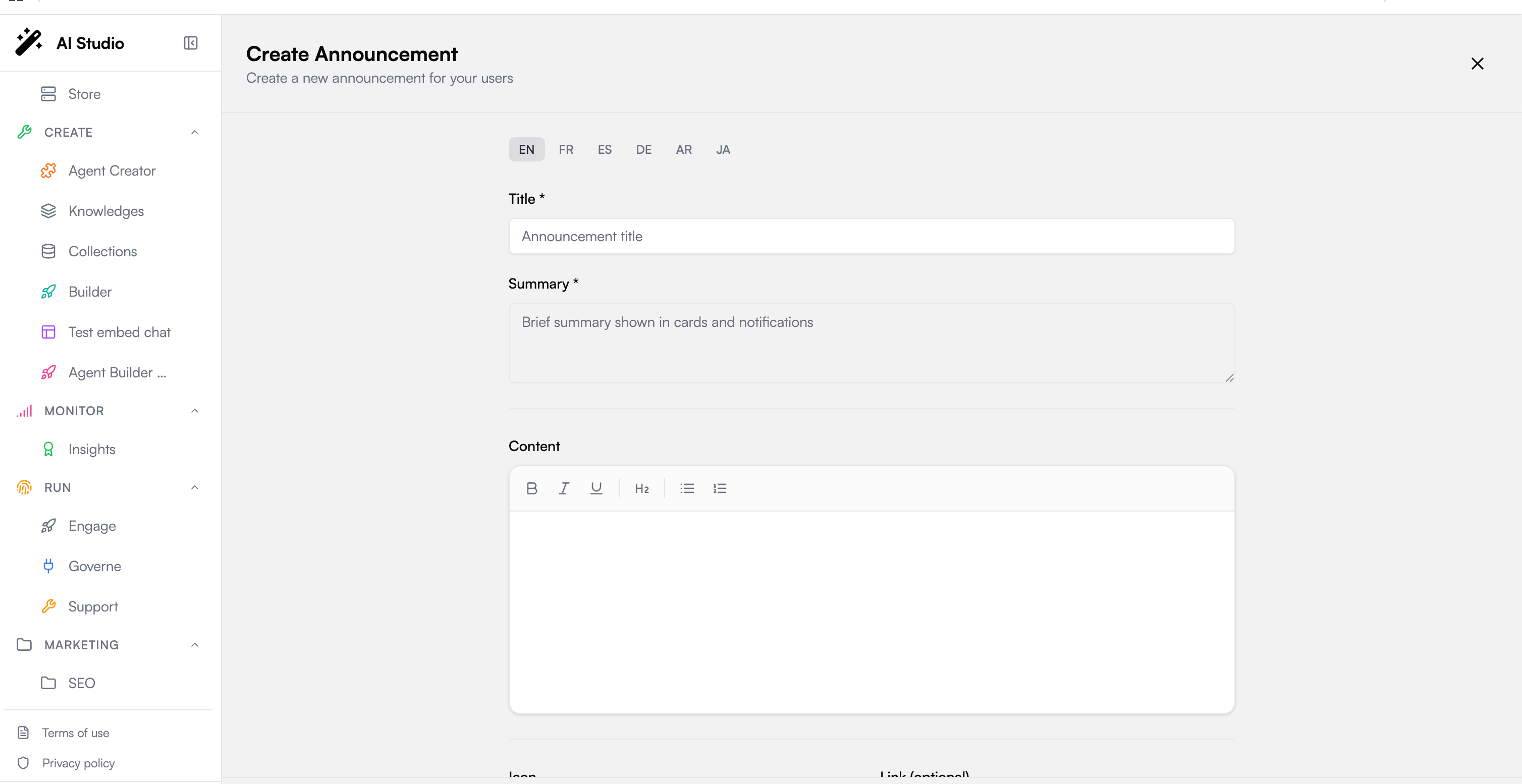
Author title, summary, and content per language (EN, FR, ES, DE, AR, JA) so each user reads the announcement in theirs.
## How it works
Engage is organized into three areas.
### Dashboard
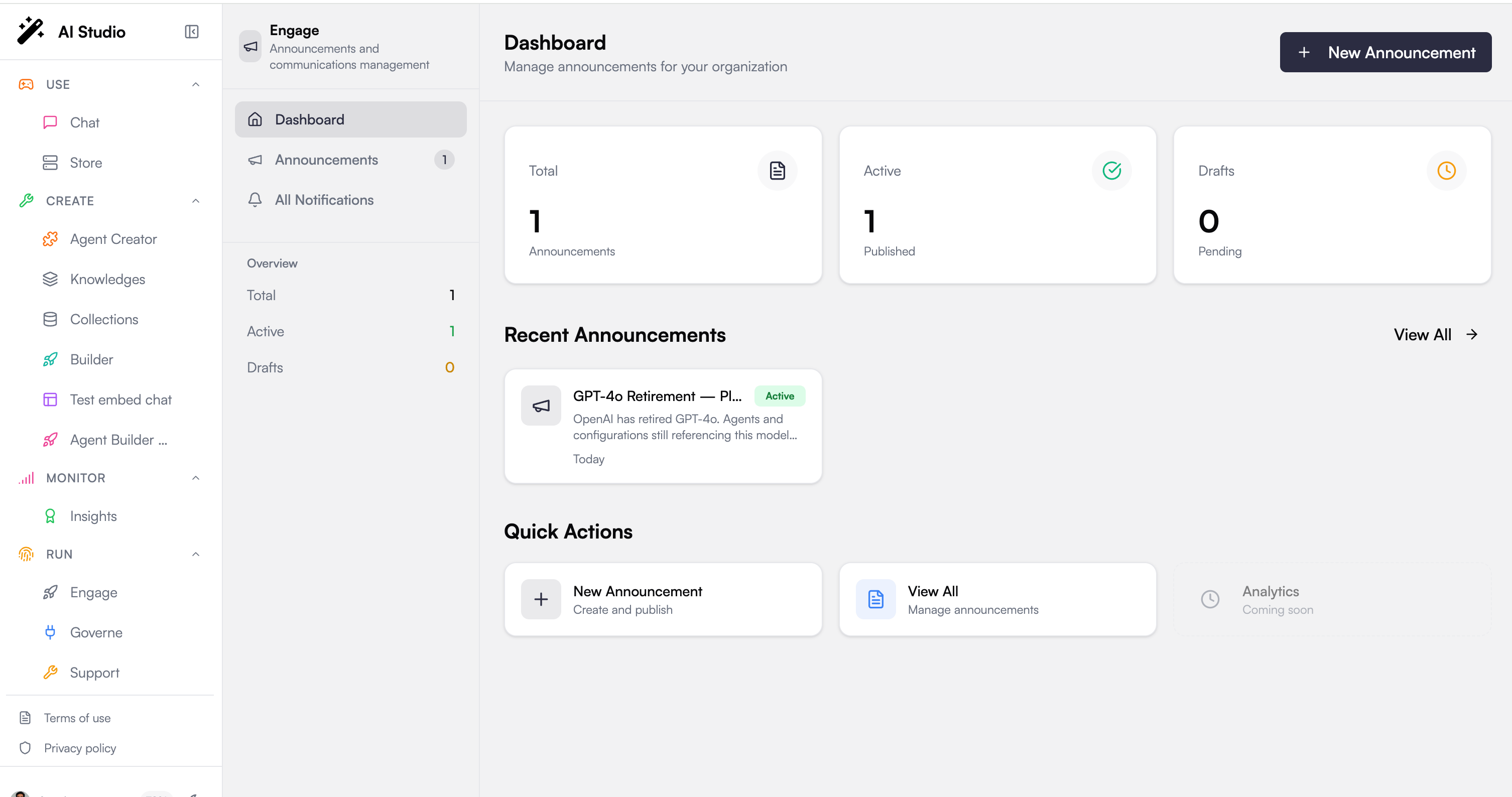
Your communications at a glance: how many announcements are **Total**, **Active**, and in **Drafts**, a list of recent announcements, and quick actions to create a new one or review existing ones.
### Announcements
The heart of Engage. Each announcement carries:
* **Title & summary**, the summary is what users see first, in cards and notifications
* **Rich content**, a formatted body (bold, italic, underline, headings, bullet and numbered lists) for the full message
* **Icon & link**, an optional emoji and a click-through link (an internal route like `/features/new` or an external URL)
* **Expiration**, an optional date after which the announcement stops showing
* **Status**, save as a **Draft** to keep working, or **Publish** to make it live
Where [Insights](../ai-insights/overview) tells you *how* adoption is going, Engage is how you *drive* it.
## Where Engage fits in the story
The foundation gives you a full lifecycle, and Engage is the step most platforms forget:
Create agents and applications with [Agent Creator](../agent-factory/overview) and [Builder](../ai-builder/overview).
Users discover and use them through the Store and [Chat](../ai-securechat/overview).
Track quality, usage, and compliance with [Insights](../ai-insights/overview).
Announce, inform, and re-engage users to turn a catalog of agents into real, sustained adoption.
## What you can do
Craft rich announcements, title, summary, and formatted content, to tell users what's new and why it matters.
Deliver each message to the right people: by product, by role, by permission, or to specific users, nothing more, nothing less.
Announcements surface as in-platform notifications users can read, open, and dismiss from a dedicated notifications inbox.
Author title, summary, and content per language (EN, FR, ES, DE, AR, JA) so each user reads the announcement in theirs.
## How it works
Engage is organized into three areas.
### Dashboard
Your communications at a glance: how many announcements are **Total**, **Active**, and in **Drafts**, a list of recent announcements, and quick actions to create a new one or review existing ones.
### Announcements
The heart of Engage. Each announcement carries:
* **Title & summary**, the summary is what users see first, in cards and notifications
* **Rich content**, a formatted body (bold, italic, underline, headings, bullet and numbered lists) for the full message
* **Icon & link**, an optional emoji and a click-through link (an internal route like `/features/new` or an external URL)
* **Expiration**, an optional date after which the announcement stops showing
* **Status**, save as a **Draft** to keep working, or **Publish** to make it live
 ### All Notifications
The user-facing side of Engage. Published announcements become **notifications** users can filter (all / unread / read), open to read in full, and dismiss once handled.
## Targeting: the right message to the right people
Engage inherits the platform's governance model, so **who sees an announcement is defined with the same roles and permissions as everything else**. For each announcement you choose the audience across four dimensions (combined so a user must match the targeting to receive it):
| Dimension | Example |
| --------------- | -------------------------------------------------------------------------------- |
| **Products** | Everyone, or only users of Agent Creator, Chat, Builder… |
| **Roles** | Everyone, or only Owners / Admins / Editors / Viewers (or your custom org roles) |
| **Permissions** | Restrict to holders of a specific permission |
| **Users** | Send to specific individuals |
### All Notifications
The user-facing side of Engage. Published announcements become **notifications** users can filter (all / unread / read), open to read in full, and dismiss once handled.
## Targeting: the right message to the right people
Engage inherits the platform's governance model, so **who sees an announcement is defined with the same roles and permissions as everything else**. For each announcement you choose the audience across four dimensions (combined so a user must match the targeting to receive it):
| Dimension | Example |
| --------------- | -------------------------------------------------------------------------------- |
| **Products** | Everyone, or only users of Agent Creator, Chat, Builder… |
| **Roles** | Everyone, or only Owners / Admins / Editors / Viewers (or your custom org roles) |
| **Permissions** | Restrict to holders of a specific permission |
| **Users** | Send to specific individuals |
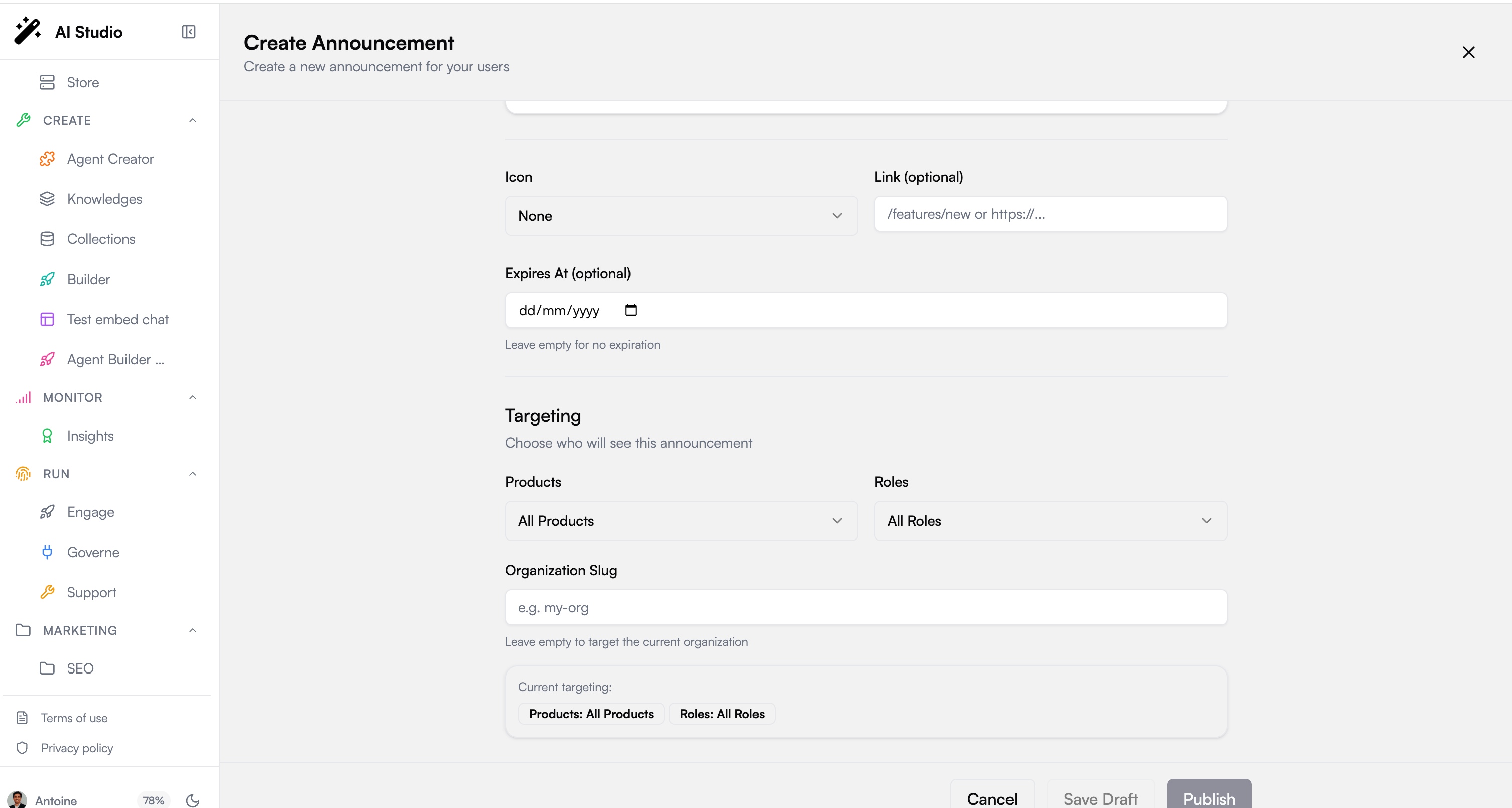 **Central + per-org, as everywhere on the platform.** Organization admins publish to their own organization. Platform super-admins can additionally target a **specific organization** by slug, the same two-level governance model that runs through [Governe](../ai-governance/overview).
## Next steps
Measure the adoption your announcements are driving
Understand the roles and permissions that power targeting
**Central + per-org, as everywhere on the platform.** Organization admins publish to their own organization. Platform super-admins can additionally target a **specific organization** by slug, the same two-level governance model that runs through [Governe](../ai-governance/overview).
## Next steps
Measure the adoption your announcements are driving
Understand the roles and permissions that power targeting