> ## Documentation Index
> Fetch the complete documentation index at: https://docs.prisme.ai/llms.txt
> Use this file to discover all available pages before exploring further.
# Dashboard
> The Engage home page: announcement stats, recent announcements, and quick actions to create and manage communications
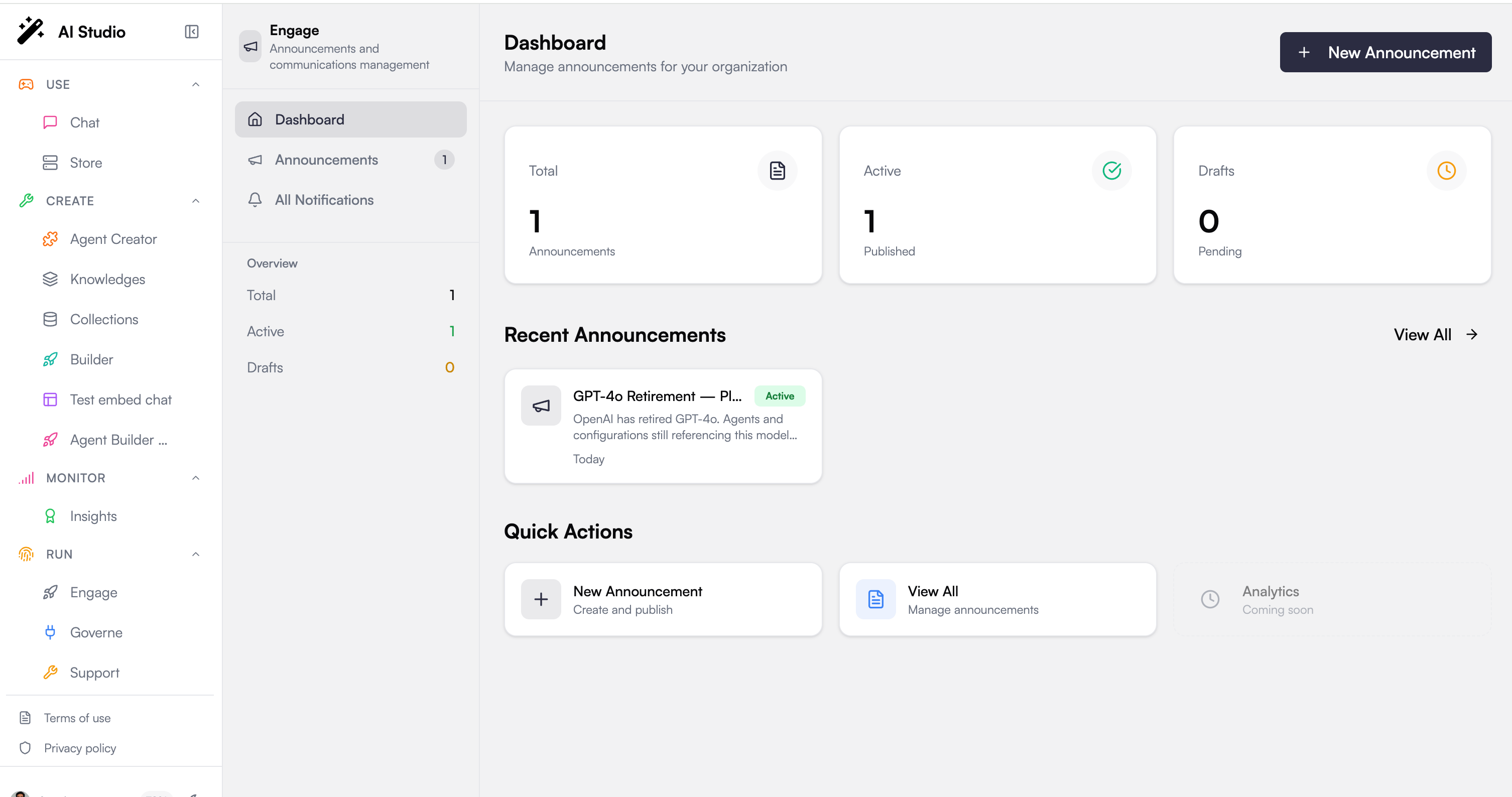
The Dashboard is your home page in [Engage](./overview). It gives you a snapshot of your communications and the quickest path to your next action, whether that is publishing a new announcement or reviewing what is already out there.
 ## Stats at a glance
Three cards summarize the state of your announcements:
| Stat | Meaning |
| ---------- | ---------------------------------------------------------------- |
| **Total** | All announcements in your organization, drafts and active alike |
| **Active** | Announcements that are published and reaching their audience |
| **Drafts** | Announcements still being worked on and not yet visible to users |
## Recent announcements
Below the stats, a list of your most recent announcements gives you fast access to what you have been working on. Each card shows the announcement's icon, title, summary, status (Active or Draft), and how long ago it was created. Select any card to open it, and use **View All** to jump to the full [Announcements](./announcements) list.
## Quick actions
The quick actions let you move without hunting through menus:
Start a new announcement and publish it to your users.
Open the full announcements list to filter, edit, or delete existing ones.
## Next steps
Create, edit, target, and publish announcements
See the user-facing feed your announcements land in
## Stats at a glance
Three cards summarize the state of your announcements:
| Stat | Meaning |
| ---------- | ---------------------------------------------------------------- |
| **Total** | All announcements in your organization, drafts and active alike |
| **Active** | Announcements that are published and reaching their audience |
| **Drafts** | Announcements still being worked on and not yet visible to users |
## Recent announcements
Below the stats, a list of your most recent announcements gives you fast access to what you have been working on. Each card shows the announcement's icon, title, summary, status (Active or Draft), and how long ago it was created. Select any card to open it, and use **View All** to jump to the full [Announcements](./announcements) list.
## Quick actions
The quick actions let you move without hunting through menus:
Start a new announcement and publish it to your users.
Open the full announcements list to filter, edit, or delete existing ones.
## Next steps
Create, edit, target, and publish announcements
See the user-facing feed your announcements land in