> ## Documentation Index
> Fetch the complete documentation index at: https://docs.prisme.ai/llms.txt
> Use this file to discover all available pages before exploring further.
# App Store Overview
> An introduction to the Prisme.ai App Store and integration capabilities
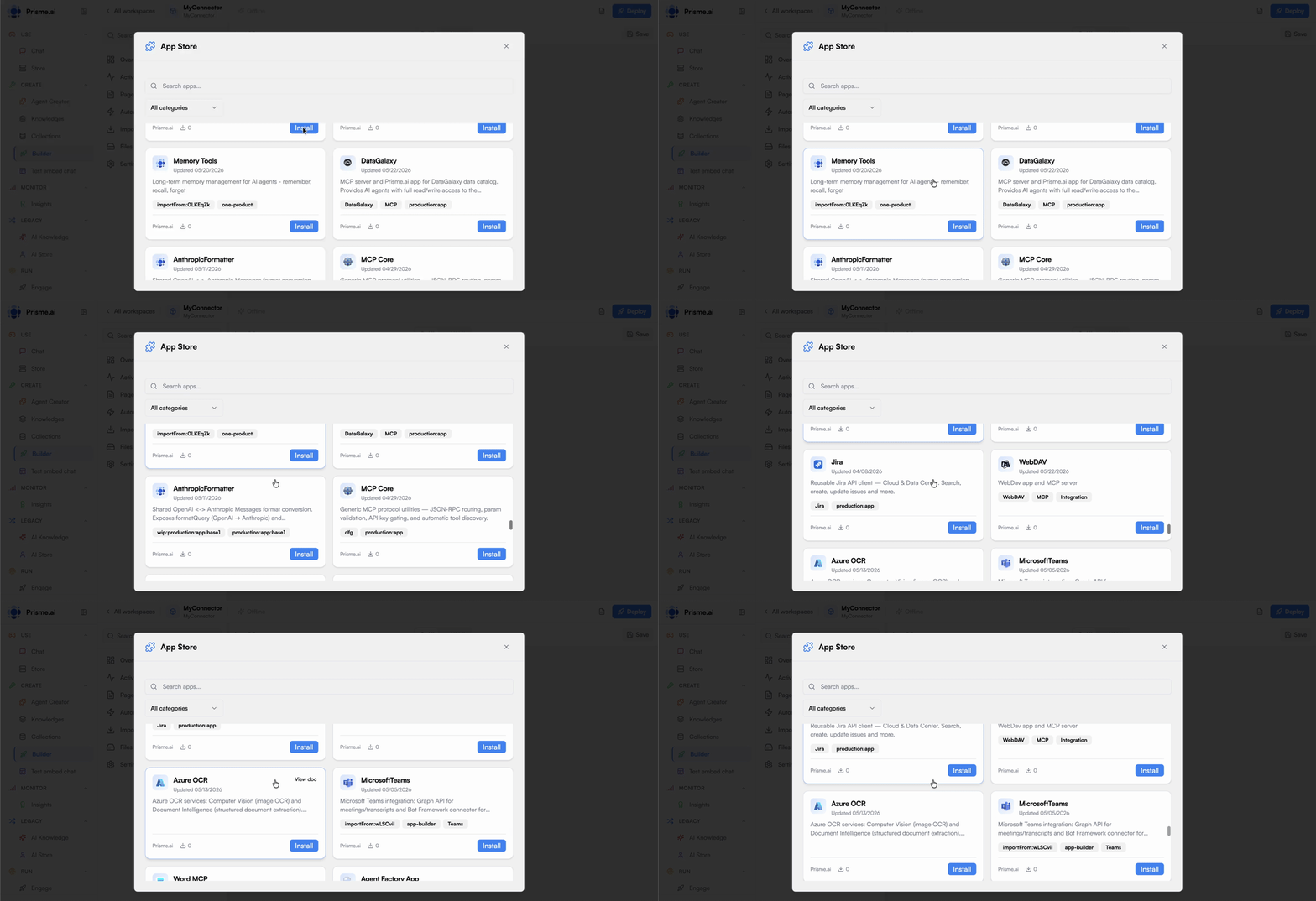 Prisme.ai provides a powerful and flexible App Store that enables you to extend the platform with various integration points, connect to external data sources, and create reusable components across your organization. In the current Builder UI, open any workspace and click **+** beside **Imports** to browse the App Store.
## What is the App Store?
The App Store is Prisme.ai's central hub for discovering, installing, and managing integrations and extensions. It provides a standardized way to incorporate external services, data sources, and specialized capabilities into your AI projects.
A single location for all your integration needs, simplifying discovery and management
Secure app management with centralized credential handling and access permissions
Share capabilities across teams and projects to maximize development efficiency
Consistent interaction patterns that reduce learning curve and integration complexity
## Types of Apps
The App Store includes various types of integrations to address different needs:
Connect to external services and APIs:
* Email services (SendMail, Mailjet, etc.)
* CRM platforms (Salesforce, Dynamics, etc.)
* Collaboration tools (Slack, Teams, etc.)
* Document management systems (SharePoint, Google Drive, etc.)
* Payment processors
* And many more
API connectors handle authentication, data transformation, and communication protocols, allowing you to seamlessly integrate external systems with your AI solutions.
Access Prisme.ai platform microservices and infrastructure components:
* Crawler for web content extraction
* Custom Code for complex data processing
* Collection for simplified database access
* Authentication services
* Vector stores
* Storage solutions
These apps leverage the underlying infrastructure of Prisme.ai, providing managed services that eliminate the need for separate deployments.
Enhance your interfaces with specialized UI components:
* Dialog boxes and modals
* Advanced charts and visualizations
* Form components
* Navigation elements
* Data tables
* Media players
UI components help you build rich, interactive interfaces without developing everything from scratch.
Comprehensive apps that combine multiple aspects:
* Backend services with frontend components
* Data processing with visualization
* Integration with specialized UI
These unified solutions address complex use cases through a single app installation.
## Key Benefits of the App Store
Leverage pre-built integrations instead of developing from scratch
Centralized credential management and access controls
Consistent patterns across integrations
Enterprise-grade performance for high-demand scenarios
Visibility and control over app usage
Share capabilities across projects and teams
## Integration Architecture
The App Store is built on a modular architecture that enables seamless integration with both the Prisme.ai platform and external systems:
Users browse the App Store, review available apps, and install them to their workspace
Apps are configured with necessary credentials and settings, which are securely stored
Installed apps expose actions, data sources, or components that can be used in workflows and interfaces
When invoked, apps connect to their respective services or provide functionality according to their design
Usage, performance, and security are monitored through the platform's governance features
## Common Use Cases
Extend AI agents with capabilities beyond conversation:
* Enable agents to send emails or notifications
* Allow agents to retrieve data from enterprise systems
* Give agents the ability to update records in external databases
* Provide agents with real-time data from APIs
This transforms AI agents from purely conversational interfaces into active participants in business processes, capable of taking actions and accessing up-to-date information.
Enhance Retrieval-Augmented Generation with diverse data sources:
* Crawl websites for current information
* Connect to document management systems
* Access enterprise databases
* Integrate with knowledge management platforms
This ensures that your AI systems have access to the most relevant and current information, improving response accuracy and usefulness.
Create end-to-end business processes with integrated apps:
* Trigger workflows from external events
* Process and transform data
* Make decisions based on AI analysis
* Update systems of record
* Send notifications and alerts
This combines the intelligence of AI with practical business actions, automating complete processes rather than isolated tasks.
Build specialized user experiences with UI components:
* Interactive dashboards for data visualization
* Domain-specific input forms
* Custom chat interfaces
* Embedded AI assistants in applications
This allows you to create tailored user experiences that match your brand and workflows while leveraging Prisme.ai's underlying capabilities.
## Internal App Store for Enterprise
One of the most powerful aspects of the App Store is the ability to create your own internal App Store with custom integrations:
Create connectors for your organization's existing systems, making them accessible to AI solutions
Manage API keys, credentials, and access controls in one secure location
Share specialized integrations across departments and projects
Establish consistent integration patterns across your organization
This internal App Store approach maximizes reuse and allows AI agents to leverage organizational tools and systems, enabling automation at scale while maintaining security and governance.
## Getting Started
To begin using the App Store:
In Builder, open any workspace and click **+** next to **Imports** in the sidebar.
Browse the App Store to discover pre-built integrations and components
Add apps to your workspace based on your integration needs
Set up authentication and other required parameters
Incorporate app capabilities into your automations and interfaces
For specialized needs, develop custom apps to extend the App Store
## Next Steps
Learn about the security aspects of app integrations
Explore the structure and features of the App Store
Discover the different types of available integrations
Create your own apps to extend the App Store
Prisme.ai provides a powerful and flexible App Store that enables you to extend the platform with various integration points, connect to external data sources, and create reusable components across your organization. In the current Builder UI, open any workspace and click **+** beside **Imports** to browse the App Store.
## What is the App Store?
The App Store is Prisme.ai's central hub for discovering, installing, and managing integrations and extensions. It provides a standardized way to incorporate external services, data sources, and specialized capabilities into your AI projects.
A single location for all your integration needs, simplifying discovery and management
Secure app management with centralized credential handling and access permissions
Share capabilities across teams and projects to maximize development efficiency
Consistent interaction patterns that reduce learning curve and integration complexity
## Types of Apps
The App Store includes various types of integrations to address different needs:
Connect to external services and APIs:
* Email services (SendMail, Mailjet, etc.)
* CRM platforms (Salesforce, Dynamics, etc.)
* Collaboration tools (Slack, Teams, etc.)
* Document management systems (SharePoint, Google Drive, etc.)
* Payment processors
* And many more
API connectors handle authentication, data transformation, and communication protocols, allowing you to seamlessly integrate external systems with your AI solutions.
Access Prisme.ai platform microservices and infrastructure components:
* Crawler for web content extraction
* Custom Code for complex data processing
* Collection for simplified database access
* Authentication services
* Vector stores
* Storage solutions
These apps leverage the underlying infrastructure of Prisme.ai, providing managed services that eliminate the need for separate deployments.
Enhance your interfaces with specialized UI components:
* Dialog boxes and modals
* Advanced charts and visualizations
* Form components
* Navigation elements
* Data tables
* Media players
UI components help you build rich, interactive interfaces without developing everything from scratch.
Comprehensive apps that combine multiple aspects:
* Backend services with frontend components
* Data processing with visualization
* Integration with specialized UI
These unified solutions address complex use cases through a single app installation.
## Key Benefits of the App Store
Leverage pre-built integrations instead of developing from scratch
Centralized credential management and access controls
Consistent patterns across integrations
Enterprise-grade performance for high-demand scenarios
Visibility and control over app usage
Share capabilities across projects and teams
## Integration Architecture
The App Store is built on a modular architecture that enables seamless integration with both the Prisme.ai platform and external systems:
Users browse the App Store, review available apps, and install them to their workspace
Apps are configured with necessary credentials and settings, which are securely stored
Installed apps expose actions, data sources, or components that can be used in workflows and interfaces
When invoked, apps connect to their respective services or provide functionality according to their design
Usage, performance, and security are monitored through the platform's governance features
## Common Use Cases
Extend AI agents with capabilities beyond conversation:
* Enable agents to send emails or notifications
* Allow agents to retrieve data from enterprise systems
* Give agents the ability to update records in external databases
* Provide agents with real-time data from APIs
This transforms AI agents from purely conversational interfaces into active participants in business processes, capable of taking actions and accessing up-to-date information.
Enhance Retrieval-Augmented Generation with diverse data sources:
* Crawl websites for current information
* Connect to document management systems
* Access enterprise databases
* Integrate with knowledge management platforms
This ensures that your AI systems have access to the most relevant and current information, improving response accuracy and usefulness.
Create end-to-end business processes with integrated apps:
* Trigger workflows from external events
* Process and transform data
* Make decisions based on AI analysis
* Update systems of record
* Send notifications and alerts
This combines the intelligence of AI with practical business actions, automating complete processes rather than isolated tasks.
Build specialized user experiences with UI components:
* Interactive dashboards for data visualization
* Domain-specific input forms
* Custom chat interfaces
* Embedded AI assistants in applications
This allows you to create tailored user experiences that match your brand and workflows while leveraging Prisme.ai's underlying capabilities.
## Internal App Store for Enterprise
One of the most powerful aspects of the App Store is the ability to create your own internal App Store with custom integrations:
Create connectors for your organization's existing systems, making them accessible to AI solutions
Manage API keys, credentials, and access controls in one secure location
Share specialized integrations across departments and projects
Establish consistent integration patterns across your organization
This internal App Store approach maximizes reuse and allows AI agents to leverage organizational tools and systems, enabling automation at scale while maintaining security and governance.
## Getting Started
To begin using the App Store:
In Builder, open any workspace and click **+** next to **Imports** in the sidebar.
Browse the App Store to discover pre-built integrations and components
Add apps to your workspace based on your integration needs
Set up authentication and other required parameters
Incorporate app capabilities into your automations and interfaces
For specialized needs, develop custom apps to extend the App Store
## Next Steps
Learn about the security aspects of app integrations
Explore the structure and features of the App Store
Discover the different types of available integrations
Create your own apps to extend the App Store